Cómo configurar la API de Conversiones de Meta (CAPI): La guía completa
Vlad Popovici, Senior Performance Marketing & SEO Manager at Didomi, explains how Meta CAPI recovers the conversions your pixel is missing and why server-side tracking is no longer optional.


The Meta Pixel was built in 2013, when third-party cookies were the default and browsers shipped tracking out of the box. Apple's iOS 14.5 in 2021 ended that when App Tracking Transparency hit iOS apps and Safari kept tightening on the web.
Apple's Intelligent Tracking Prevention (ITP), introduced in Safari in 2017 and tightened over successive iterations, progressively dismantled that model on the web, while App Tracking Transparency extended the same logic to iOS apps.
In 2021, Apple released App Tracking Transparency. Most users opted out and Meta lost visibility into mobile conversions overnight. Aggregated Event Measurement followed shortly after, capping how many events any pixel could prioritize.
Today, Safari has blocked third-party cookies by default since 2020, with first-party cookies set via JavaScript expiring after just 7 days. Link Tracking Protection strips fbclid from URLs in Mail, Messages, and Private Browsing since iOS 17, Firefox blocks trackers out of the box, and 15 to 20% of desktop users in Western markets run an ad blocker.
Fast forward to 2026, Apple started stripping fbclid from URLs in Mail, Messages, and Private Browsing, Safari stopped using third-party cookies, Firefox blocks trackers by default, and roughly 25-40% of desktop users now run an ad blocker.
Running in the browser means anything that can interfere with the browser breaks your pixel.
Purchases happen on your store, but Events Manager shows fewer of them than your backend reports, so you start missing add-to-cart, checkout and purchase events.
The Meta Conversion API (CAPI), formerly known as Facebook Conversions API is how you can get your data back, track more conversions and be able to attribute wins to the right campaign.
What is Meta CAPI (Conversion API)?
Meta CAPI is a server-side endpoint that takes conversion events straight from your infrastructure and hands them to Meta, skipping the browser entirely. It sits behind your site and posts the same events over HTTPS, server to server, where no browser restriction applies.
Players like Meta started publicly explaining that Apple had removed third-party cookies, that campaign performance had degraded, and that advertisers needed to shift toward server-side.Meta released an API that’s compatible with Google Tag Manager, and therefore with Addingwell. When advertisers spoke with their Meta account managers, they were encouraged to implement CAPI (Conversions API), which requires a server-side setup.-
Romain Baert, Manager server-side tracking at Addingwell by Didomi (source: Didomi blog)
Meta CAPI vs Meta Pixel: What's the Difference?
The Meta Pixel is JavaScript on your site sending events from the user's browser to Meta. Meta CAPI is a server-side API sending the same events from your backend to Meta.
They solve different failure modes, which is exactly why Meta wants you running both.
The Meta Pixel still wins on real-time browser signals when cookies make it through. Meta CAPI picks up the events the Meta Pixel never sees.
How Meta CAPI Works
Meta CAPI (Conversions API) is a server-to-server channel that sends events directly from your infrastructure to Meta, replacing the browser as the messenger. Here's exactly how it works:
1. An event happens on your store
When a shopper completes a purchase, your backend now holds everything Meta cares about:the order ID, the value, the currency, the products, plus the customer's email, phone, IP, user agent, and Facebook click ID (fbc) and browser ID (fbp) cookies if they're available.
2. Your server packages the event
Before anything leaves your infrastructure, the personally identifiable fields get hashed using SHA-256. Email becomes a 64-character string. Phone becomes a 64-character string. Meta receives only hashed values, which it then matches against its own hashed user database to identify the buyer.
The package now contains:
- Event data (event name, event time, event ID, event source URL, action source)
- Customer data (hashed email, hashed phone, IP, user agent, fbc, fbp, hashed name, hashed city)
- Custom data (order value, currency, content IDs, content type, number of items)
3. The event is sent to Meta's CAPI endpoint
Your server makes an authenticated HTTPS POST to graph.facebook.com/v{version}/{pixel_id}/events, with your access token in the header. Meta receives it within milliseconds and acknowledges it.
The browser is never involved, so ad blockers, ITP, Firefox tracking protection, and slow page loads have no effect on whether Meta gets the signal.
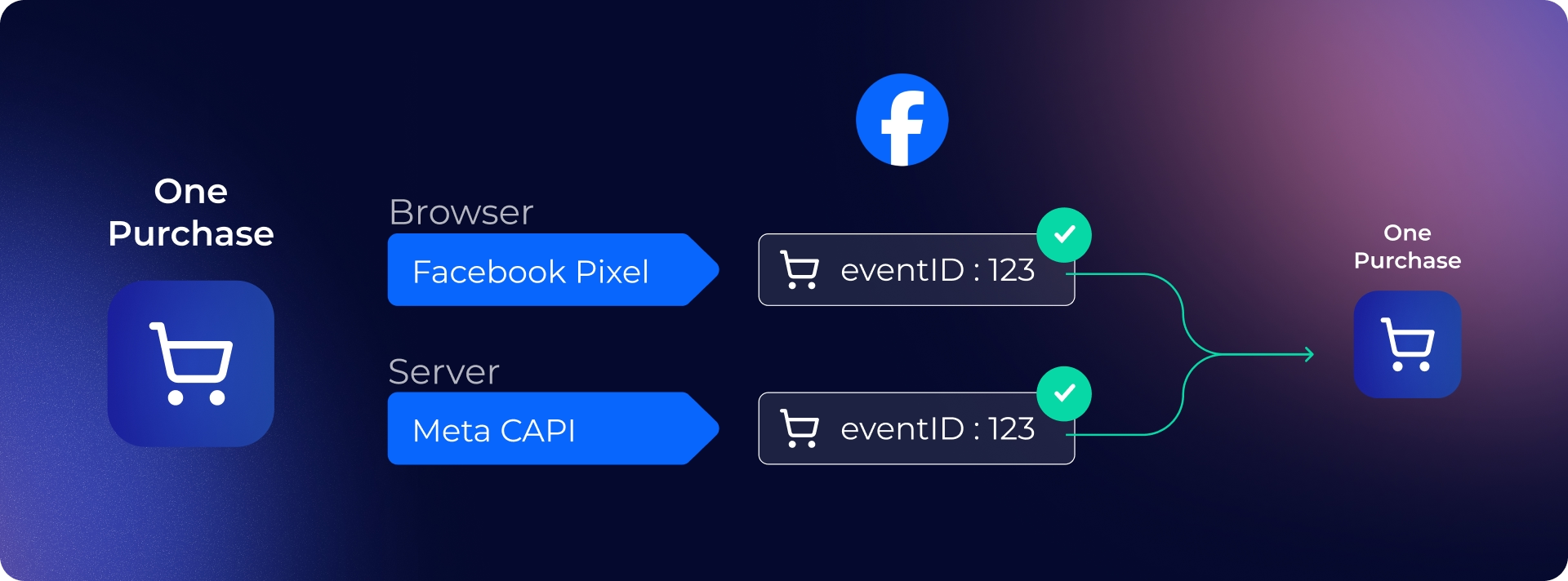
4. Deduplication with the pixel
Most setups run the pixel and CAPI in parallel for redundancy. Meta deduplicates using two fields you must send identically from both sources:
- event_id: a unique ID for that specific transaction (typically the order ID)
- event_name: must match (e.g., both say "Purchase")
When Meta sees the same event_id from the pixel and CAPI, it counts the conversion once. If the pixel was blocked, CAPI still delivers it. If both arrive, Meta keeps the richer of the two payloads.
5. Meta uses the new data
Once Meta has the customer data, it matches the event to a real user profile, which then powers everything downstream.
Event Match Quality (EMQ), scored 0-10, reflects how confidently Meta could tie the event to a known user, and that score directly shapes how much weight the conversion carries. EMQ rises when you send more customer identifiers with each event
Smart Bidding starts optimizing against the full conversion set rather than a partial one, so bids land on real buyers. Attribution credits the right ad, audience, and click.
Lookalike and retargeting audiences refresh against accurate buyer behavior, so the people Meta serves your ads to actually resemble your customers.
Why Meta CAPI Matters For Your Business
The pixel was designed for an internet that no longer exists, one without Safari ITP, without Firefox blocking trackers by default, without 25-40% of users running ad blockers.
Advertisers are investing heavily in attribution tools or in CDPs for segmentation and retargeting. But under the surface, the data is steadily deteriorating. You can't invest so much in martech if the data isn't reliable.
Romain Baert, Manager server-side tracking at Addingwell by Didomi (source: Didomi blog)
Here's how the Meta CAPI improves your campaign performance:
Restoring the missing conversions from the Meta Pixel
Every checkout that gets blocked in the browser still happens on your backend. The Meta CAPI sends those events directly from your server, so Meta sees the full picture rather than the 60-80% the pixel manages to deliver.
Improving Smart Bidding via clean data
Meta's algorithm only optimizes against what it sees. With the Meta CAPI, it trains on real conversions, so bids land on real buyers, ROAS reflects reality, and the ad performance panic usually goes away on its own.
Enhancing Event Match Quality (EMQ)
The Meta CAPI lets you send hashed email, phone, IP, and user agent server-to-server. That dramatically raises the share of events Meta can confidently match to a user, which feeds better attribution, more precise lookalikes, and stronger retargeting audiences.
Capturing events browsers miss
Refunds, subscription renewals, customer service cancellations, post-purchase upsells, in-store conversions. The Meta CAPI sends them whenever they happen, from any system that has the data.
Future-proofing your Meta setup
Every browser release tightens privacy further and a pixel-only stack means rebuilding tracking every few months. Meta CAPI runs server-to-server, so browser changes pass through without breaking anything.
Real-World Results: How Damart Recovered Lost Meta Conversions
Damart, a major European retailer, was running into the same problem, 45% of their site traffic was unmeasured, Meta was receiving only 55% of actual conversion data, and attribution was off by 64% against their internal benchmarks.
Working with Addingwell, Damart migrated to a server-side tracking architecture across five countries in two to three months.
These are the results after their migration:
- +27% more conversions attributed to FacebookAll events the Pixel was losing to ad blockers and Safari ITP now reach Meta server-to-server
- +16% more data collected overallAcross every connected platform, not Meta alone
Read the full Damart case study
Who Needs Meta CAPI?
Not every organization requires Meta CAPI. The companies that will benefit most in investing time and energy into Meta's endpoint are:
Clients spending more than €3K/month on Meta ads
Signal loss maps straight to CPA increase. At that spend level, pushing EMQ from the 6 to 8 typically pays for the tooling twice over in the first month.
Ecommerce with checkout using their own domain
Shopify, WooCommerce, Magento, and custom stacks all leak conversion data to Safari and ad blockers. Meta CAPI recovers the high-intent events (Purchase, InitiateCheckout, AddToCart) that matter most for Meta Advantage+ Shopping Campaigns (ASC) bidding.
Lead-gen accounts with long funnels
B2B, SaaS, finance, education, any vertical where the conversion lands after a form fill or later CRM qualification. The Meta CAPI lets you send downstream events (SQL, opportunity, closed-won) back to Meta, events the Meta Pixel can't reach because the real conversion happens hours or weeks after the click.
Cómo configurar Meta CAPI con Addingwell (la forma sencilla)
Asumiendo que ya tienes un contenedor web de GTM con un píxel de Facebook activo, así es como se configura Meta CAPI con Addingwell:
Paso 1: Crea un contenedor en Addingwell
Inicia sesión, crea un espacio de trabajo para el cliente, conéctalo a un contenedor de GTM del lado del servidor existente o deja que Addingwell lo proporcione por ti. El espacio de trabajo gestiona el alojamiento, el SSL, el dominio personalizado (data.cliente.com) y el tiempo de actividad.
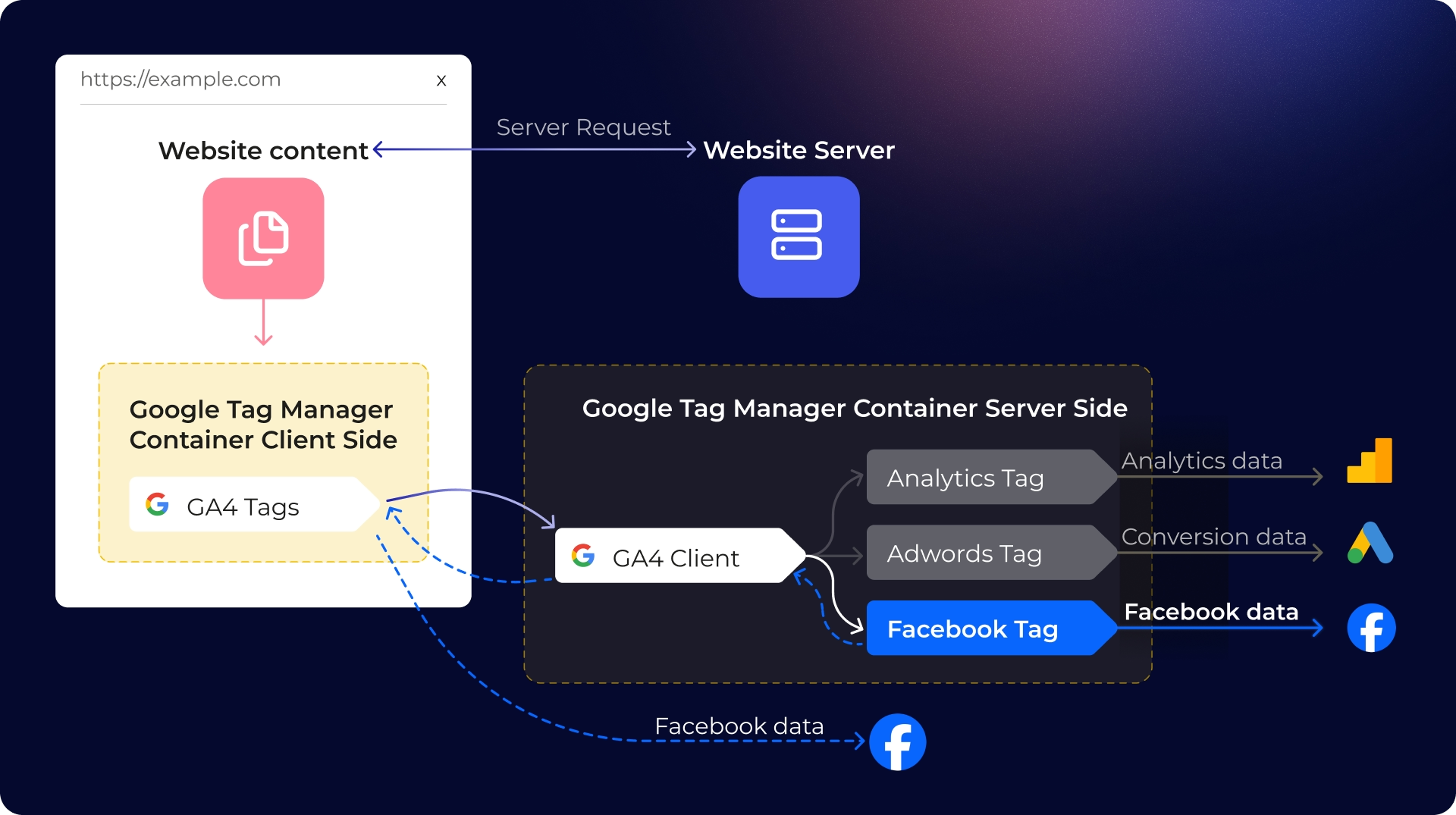
Paso 2: Apunta el GTM web al endpoint de Addingwell
Actualiza el server_container_url de la etiqueta de configuración de GA4 al subdominio de Addingwell. Los eventos ahora fluyen: navegador → servidor de Addingwell → plataformas de destino.
Paso 3: Instala la etiqueta Meta CAPI de Addingwell
Desde la galería de plantillas del contenedor del servidor, añade la etiqueta Meta CAPI de Addingwell. Una sola etiqueta gestiona tanto la solicitud del píxel del navegador como la llamada CAPI del lado del servidor, con valores event_id coincidentes generados automáticamente.
Paso 4: Mapea tus eventos
Apunta la etiqueta a los eventos importantes: Purchase, Lead, AddToCart, InitiateCheckout. La etiqueta lee los parámetros de eventos de GA4 existentes del cliente y los traduce al formato que espera CAPI, incluyendo los identificadores de usuario que impulsan el EMQ.
Paso 5: Conecta el consentimiento
Si el cliente utiliza una plataforma de gestión de consentimiento, la integración de consentimiento de Addingwell lee la elección del usuario y bloquea los eventos cuando no hay consentimiento. Sin JavaScript personalizado.
Aquí tienes la guía completa sobre cómo configurar el consentimiento con GTM del lado del servidor.
Paso 6: Verifica tu configuración
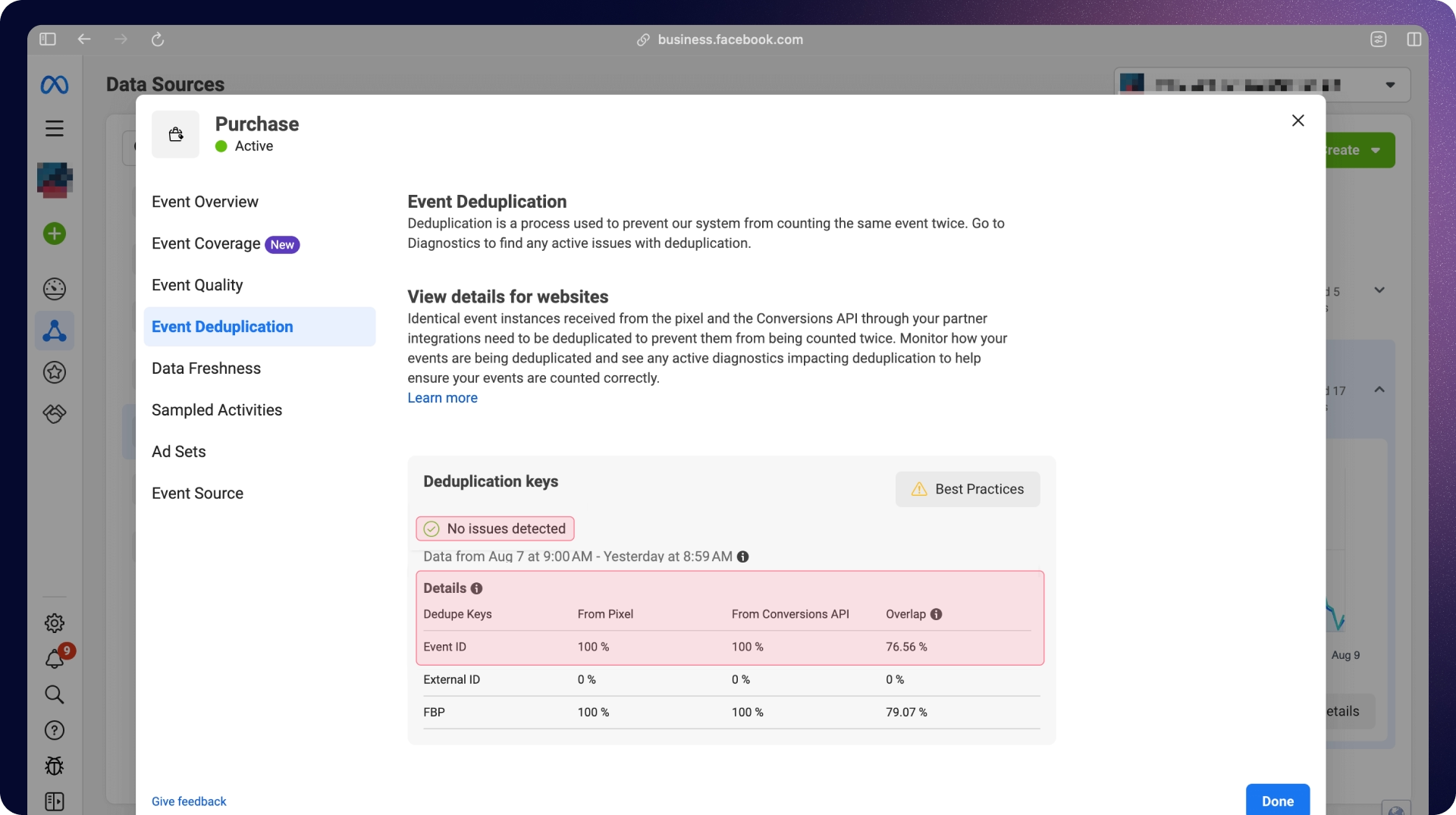
La herramienta de prueba de eventos del Administrador de eventos de Meta y la API de calidad del conjunto de datos confirman que los eventos se están recibiendo, la deduplicación funciona y el EMQ se encuentra en el rango objetivo.
El panel de control de Addingwell te envía una alerta en el momento en que los eventos dejan de llegar, lo cual suele ocurrir antes de que el cliente se dé cuenta. Si deseas profundizar en la configuración técnica, puedes leer la documentación completa para la configuración de Meta CAPI con Addingwell.
La versión DIY: Cómo configurar Meta CAPI (que en realidad no es gratis)
Existen formas de implementar Meta CAPI sin pagar a un proveedor. Sin embargo, ten en cuenta que, aunque pueda parecer tentador, por lo general no termina siendo gratuito.
Versión 1: Uso de la pasarela CAPI de Meta
Meta ofrece una pasarela alojada en AWS que gestiona la parte de servidor a servidor. Regístrate en el Administrador de eventos, conecta el conjunto de datos y sigue las instrucciones.
Costes ocultos
La pasarela en sí es gratuita, pero tú eres el responsable de la cuenta de AWS que la respalda, lo que implica: costes de alojamiento (normalmente entre 5 y 30 €/mes por cliente con tráfico normal), configuración de IAM, parches de seguridad y depuración cuando Meta actualiza la especificación subyacente.
Servicios de etiquetado limitados
La pasarela también admite un rango de casos de uso más limitado que el etiquetado completo del lado del servidor. Solo Meta. Sin enrutamiento a GA4. Sin Google Ads del lado del servidor. Sin TikTok. Sin LinkedIn. Si un cliente utiliza Meta y solo Meta, para siempre, la pasarela funciona.
Versión 2: GTM del lado del servidor autohospedado
Puedes construirlo tú mismo. Crea un servidor de etiquetado en Cloud Run, asígnale un subdominio, instala la etiqueta Meta CAPI desde la galería de plantillas de Google, introduce tu token de acceso, escribe la lógica de deduplicación y estarás listo.
El alojamiento cuesta entre 10 y 50 €/mes por un solo servidor. La guía de producción de Google recomienda tres servidores para una alta disponibilidad, lo que eleva el coste base a unos 120 €/mes por cuenta, antes de incluir la monitorización y el soporte técnico. Con una cartera de 10 cuentas, verás cómo esto se convierte rápidamente en una pequeña operación de SaaS.
El conocimiento técnico es gratuito. Simo Ahava, y la documentación de Meta cubrimos cada paso.
Las desventajas de tener que encargarse de la configuración son:
- Escalar el servidor durante los picos de tráfico del Black Friday
- Renovar los tokens de acceso antes de que caduquen
- Actualizar la lógica de consentimiento cada vez que la CMP del cliente cambia de versión
- Aplicar parches cuando el SDK de Meta se actualiza
- Depurar los problemas aleatorios cuando falla el EMQ
- Explicar al director financiero de la agencia por qué siguen apareciendo cargos de GCP
Comparativa de configuración de Meta CAPI
Referencia de parámetros de Meta CAPI
La calidad de tu implementación de Meta CAPI depende de los parámetros que envíes con cada evento. Si envías muy pocos, la calidad de coincidencia de eventos (Event Match Quality) caerá en picado. Si los formateas mal, Meta rechazará el evento.
Aquí tienes la referencia completa, agrupada en los cuatro bloques que requiere Meta:
Parámetros de evento obligatorios
Estos tres deben estar presentes en cada evento, o Meta lo descartará.
- event_nameEl nombre del evento estándar (Purchase, AddToCart, Lead, ViewContent, InitiateCheckout, AddPaymentInfo, CompleteRegistration). Se permiten eventos personalizados, pero pierden acceso a gran parte de las funciones de optimización de Meta.
- event_timeMarca de tiempo Unix de cuándo ocurrió el evento. Meta acepta eventos con hasta 7 días de retraso, pero cualquier retraso superior a una hora reduce el valor de optimización.
- action_sourceEl origen del evento. sitio web para eventos basados en navegador, generado_por_sistema para eventos de CRM y backend, *tienda_fisica para eventos en tienda, app *para eventos en aplicaciones móviles. Si te equivocas, Meta los clasificará incorrectamente o los rechazará.
Parámetros de datos de usuario que aumentan el EMQ
Estos residen dentro del objeto user_data . Cada campo de PII debe estar cifrado con SHA-256 después de normalizarlo (minúsculas, eliminar espacios en blanco, formato de teléfono E.164).
- emCorreo electrónico cifrado. Es el parámetro con mayor impacto de la lista. Incluirlo aumenta el EMQ en aproximadamente 4 puntos.
- phTeléfono cifrado en formato E.164 (ejemplo: +13612345678→ hash). Vale alrededor de 3 puntos de EMQ.
- fn / lnNombre y apellido cifrados, en minúsculas.
- ct / st / zp / countryCiudad, estado, código postal y código de país con hash.
- external_idTu ID de cliente interno, con hash. Ayuda a Meta a mantener la identidad estable entre sesiones.
- client_ip_addressTexto sin formato, capturado de la solicitud. No aplicar hash.
- client_user_agentTexto sin formato. No aplicar hash.
Los identificadores del navegador no deben tener hash
Estos dos son los puntos de fallo de implementación más comunes. Ambos deben enviarse en texto sin formato, ya que el hash impide que Meta pueda vincular el evento del servidor con la sesión del navegador.
- fbpEl ID de navegador que Meta establece en la _fbp cookie de origen. Formato: fb.1.[creation_timestamp].[random_number]. Léelo desde la cookie en tu servidor y transmítelo sin cambios.
- fbcEl ID de clic que Meta añade como fbclid cuando un usuario hace clic en un anuncio. Formato: fb.1.[creation_timestamp].[fbclid_value]. Only set fbc when a real fbclid exists in the URL. Fabricating it degrades data integrity and Meta will catch it.
Custom data parameters
These describe the conversion itself.
- value - Numeric value of the conversion.
- currency - Three-letter ISO code (USD, EUR, GBP).
- content_ids - Array of product IDs for catalog events.
- content_type -product or product_group.
- content_name / content_category - Optional, but lift event richness for ASC bidding.
- num_items - Quantity in the order.
- order_id - Useful as the source of your event_id for deduplication.
How to Improve Your Event Match Quality (EMQ)
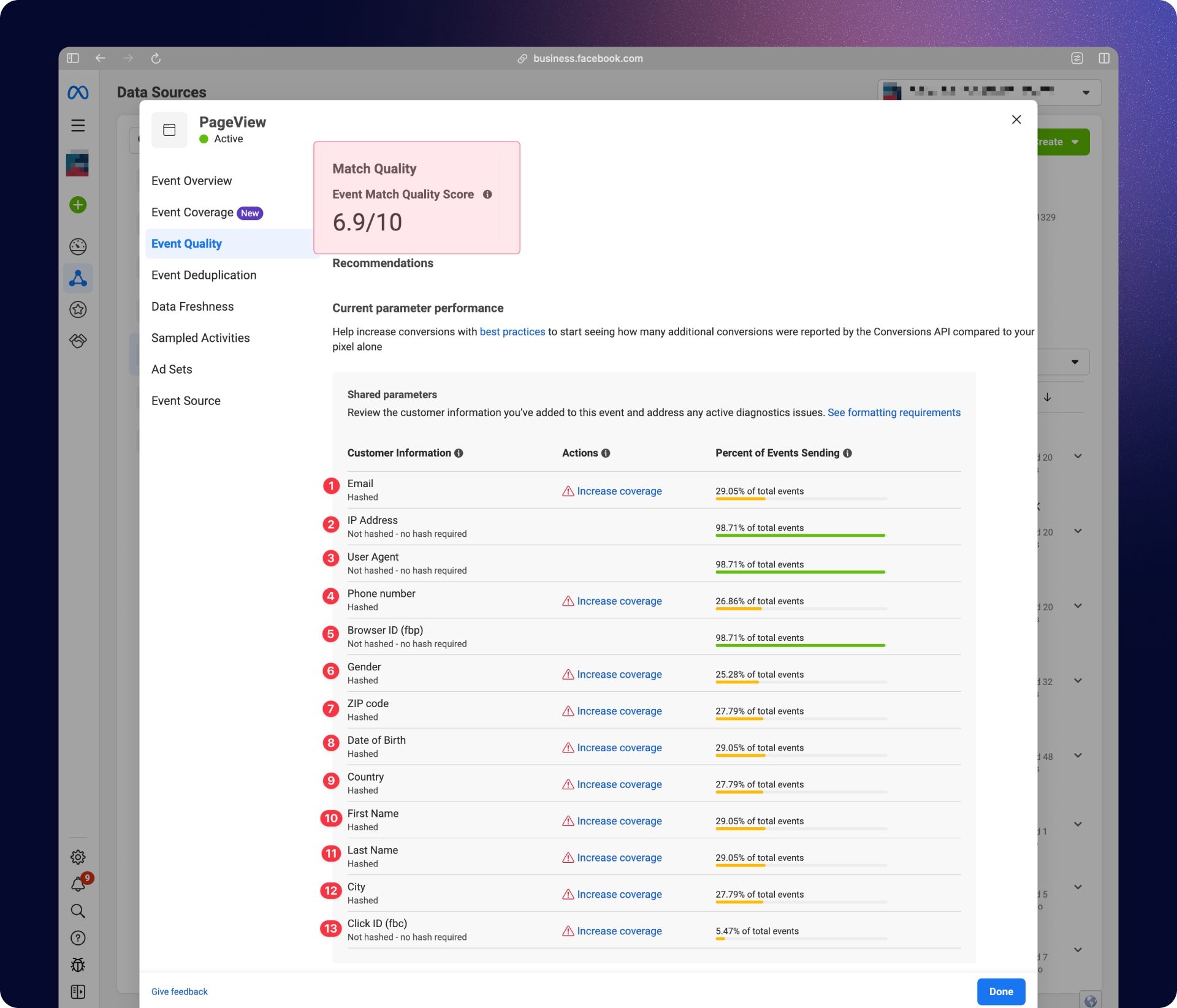
Event Match Quality is Meta's 0-to-10 confidence score for how well it can tie a Meta CAPI event to a real Facebook profile. It updates every 48 hours in Events Manager, and the score directly influences how much weight the conversion carries in Smart Bidding, lookalike audiences, and attribution.
Target Event Match Quality scores by event type
Different events carry different identifier richness, so the targets differ.
- Purchase: 8.8–9.3. The user just gave you their email, phone, and address.
- AddToCart: 8.0+
- InitiateCheckout: 7.5+
- Lead: 7.5+, depending on the form
- PageView: 6.5–7.5. The user has not handed over personal data yet, so matching is inherently weaker.
The highest-impact levers for Event Match Quality scores
- Send hashed email on every event where you have it. This is the single biggest move, typically +4 EMQ points.
- Send hashed phone in E.164 format. Typically +3 EMQ points.
- Include fbp and fbc unhashed. Connects server events to browser sessions.
- Send multiple identifiers together. Email + phone + external_id + fbp + fbc on the same event matches more confidently than any single field alone.
- Turn on Advanced Matching in the Pixel. It captures additional form-field data automatically and supplements your CAPI payload.
Common Meta CAPI Setup Mistakes to Avoid
Hashing fbp and fbc
These two cookie values must be sent in plain text. They are not personally identifiable information and Meta uses them as session matching keys, not user identifiers. Hashing them breaks Meta's ability to connect your server event to the browser session it came from, which tanks your EMQ.
Mismatched event_id causing double-counting
If the event_id in your Pixel call doesn't exactly match the event_id in your CAPI request; including casing and whitespace, the deduplication fails.Meta counts both events. Your reported conversions double, your bidding algorithm chases non-existing revenue, and it takes longer to rollback than the original setup would have taken to do the setup correctly.
Forgetting to capture fbclid for downstream CRM events
If you plan to send CRM events through CAPI (qualified lead, demo booked, closed-won), you must capture the fbclid parameter from the landing page URL at the moment of initial form submission and store it with the contact record. Meta cannot attribute the downstream CRM conversion back to the original ad click without it.
Using the wrong action_source
Website events use "website". CRM and backend events use "system_generated". In-store or offline events use "physical_store". Using the wrong value causes Meta to misclassify or reject events entirely.
Sending events with significant latency
The Meta CAPI accepts events up to 7 days after they occur, but events sent hours or days later provide meaningfully less optimization value. Meta's algorithm needs signals close to real-time to bid efficiently. So send your events within minutes of the conversion.
Running Pixel + CAPI without deduplication
If you fire both without matching event_id values, every conversion gets counted twice. Smart Bidding starts optimizing against a dataset that's twice the size of your real one, CPAs look artificially low, and ROAS looks artificially high.
Conclusion: The pixel-only era is over
Today, server-side already enables up to 20% ROAS optimization, even with third-party cookies still active on Chrome. That's huge.
Romain Baert, Manager server-side tracking at Addingwell by Didomi (source: Didomi blog)
The Meta CAPI helps capture missing conversions, lifts Event Match Quality so Smart Bidding can start optimizing for real buyers.
The setup itself is not that difficult, however, the maintenance part is the one teams underestimate. Having to deal with token rotations, CMP version changes, Meta SDK changes, scaling and EMQ drop events make a managed solution much more feasible.
That’s why Addingwell exists.
Get started with Addingwell for free and have Meta CAPI live for one Meta dataset by the end of the day (first 100k requests free).
Read the full Meta CAPI documentation for the complete technical reference: parameter mapping and benefits, consent with server-side GTM, EMQ verification, and the dataset quality checklist.
Meta CAPI FAQs
What is Meta CAPI?
Meta CAPI (Conversions API, formerly Facebook Conversions API) is a server-to-server endpoint that sends conversion events from your infrastructure to Meta without going through the user's browser. It recovers the conversion data the Facebook Pixel loses to ad blockers, Safari's ITP, and other browser-level restrictions.
Do I need both the Meta Pixel and Meta CAPI?
Yes, in almost every case. Meta's current guidance is dual tracking: run the Pixel for real-time browser context and CAPI for server-side reliability. The two together, with matching event_id values for deduplication, give you the most complete signal and the strongest campaign optimization.
How long does Meta CAPI setup take?
With a managed platform like Addingwell, a marketer comfortable in GTM can ship Meta CAPI in two to four hours per account, no developer required. A self-hosted server-side GTM setup typically takes one to two days of an analytics engineer's time, plus ongoing maintenance. Meta's own CAPI Gateway sits in between at one to three hours, with some AWS setup involved.
Is Meta CAPI free?
The API itself is free. Meta charges nothing for sending events through it. Shipping it requires infrastructure, which costs money or time. Meta's CAPI Gateway costs AWS hosting. Self-hosted server-side GTM on Google Cloud runs €10-€50/month at low traffic and €120+/month for production-grade availability. A managed platform like Addingwell bundles hosting, tags, consent, and monitoring into a single subscription and you can get started for free.
What is Event Match Quality (EMQ) in Meta CAPI?
EMQ is Meta's 0-to-10 score measuring how confidently Meta can match your CAPI events to Facebook user profiles. Higher EMQ means better delivery and stronger lookalikes. Commonly cited targets: 6.5–7.5 for PageView, 8.0+ for AddToCart, and 8.8–9.3 for Purchase. Sending hashed email, hashed phone, fbc, fbp, client_ip_address, and client_user_agent on every event pushes EMQ up fastest. Hashed email moves the number more than any other field.
How does Meta CAPI deduplication work?
When both the Pixel and CAPI fire for the same conversion, you attach an identical event_id to each event. Meta receives both, matches them by event name and event ID, and counts them as a single conversion. Skip this step and your reported conversions double, ASC starts chasing phantom revenue, and the numbers take longer to unwind than the original setup would have taken to ship correctly.
Does Meta CAPI work with Shopify?
Yes. Shopify has a native Meta CAPI integration for basic use cases. For clients that need cross-platform routing (Google Ads, TikTok, LinkedIn), custom event logic, or consent-aware deduplication across both Pixel and CAPI, a full server-side tagging setup through Addingwell gives more control than Shopify's built-in connector.
Does Meta CAPI handle user consent?
Meta CAPI doesn't handle consent by itself. You need a CMP (consent management platform) to capture the user's choice, then conditionally fire or suppress CAPI events based on that choice. Addingwell natively integrates with Didomi and most major CMPs. Self-hosted setups require writing this logic yourself.
¿Cuál es la diferencia entre Meta CAPI y Meta CAPI Gateway?
Meta CAPI es la API en sí, el punto de conexión al que envías los eventos. Meta CAPI Gateway es un envoltorio sin código alojado que Meta ofrece para simplificar la conexión servidor a servidor. El Gateway se ejecuta en tu cuenta de AWS, solo es compatible con Meta (no con otras plataformas) y es ideal para anunciantes que buscan una configuración sencilla exclusiva para Meta. Las plataformas de etiquetado del lado del servidor completas, como Addingwell, admiten Meta CAPI además de GA4, Google Ads, TikTok, LinkedIn y más desde una única infraestructura.
¿El anuncio de "CAPI con un clic" de Meta de abril de 2026 reemplazará al etiquetado del lado del servidor?
Para los pequeños anunciantes que solo utilizan Meta con eventos estándar, la opción de un clic probablemente sea suficiente. Para cualquier cliente con un gasto significativo, eventos personalizados, seguimiento multiplataforma o requisitos de consentimiento estrictos, el etiquetado completo del lado del servidor sigue ofreciendo más control, mejor EMQ y una flexibilidad de enrutamiento que la opción de un clic no cubre.
¿Qué pasó con la API de Conversiones Offline de Meta?
Meta la retiró en mayo de 2025. Todos los eventos offline ahora se procesan a través de CAPI con action_source: physical_store o system_generated.
The author