Safari ITP and server-side tracking: Everything you need to know
Safari's seven-day cookie limit makes returning visitors look new. Learn how ITP works and how server-side tracking with Addingwell helps.


Can your analytics still recognize a Safari visitor who comes back to your website eight days after their last visit? Since April 2023, Safari’s Intelligent Tracking Prevention (ITP) has made this more challenging by limiting certain cookies to a maximum of seven days, after which a returning visitor will look like a new one. This affects your conversion attribution, which may be credited to the wrong source or none at all.
Below, we cover how that limit works, what it does to your numbers, and how server-side tracking with Addingwell helps.
Disclaimer: Everything mentioned in this article is about visitors who accepted cookies. Recovering measurement is not a reason to measure users who have declined.
What is Safari’s Intelligent Tracking Prevention (ITP)?
ITP is the anti-tracking system built into WebKit, the browser engine behind Safari on iPhone, iPad, and Mac. Each release has narrowed down the scope of cookie management for vendors:
- 2017, ITP 1.0 (Safari 11): Safari began restricting the cookies that advertisers and trackers use to follow people from one website to another.
- 2019, ITP 2.1: Capped cookies written by JavaScript at seven days, which affected most browser analytics cookies.
- 2020, Safari 14: This version applied the cap to third-party servers that used a subdomain of your site to look like a part of it.
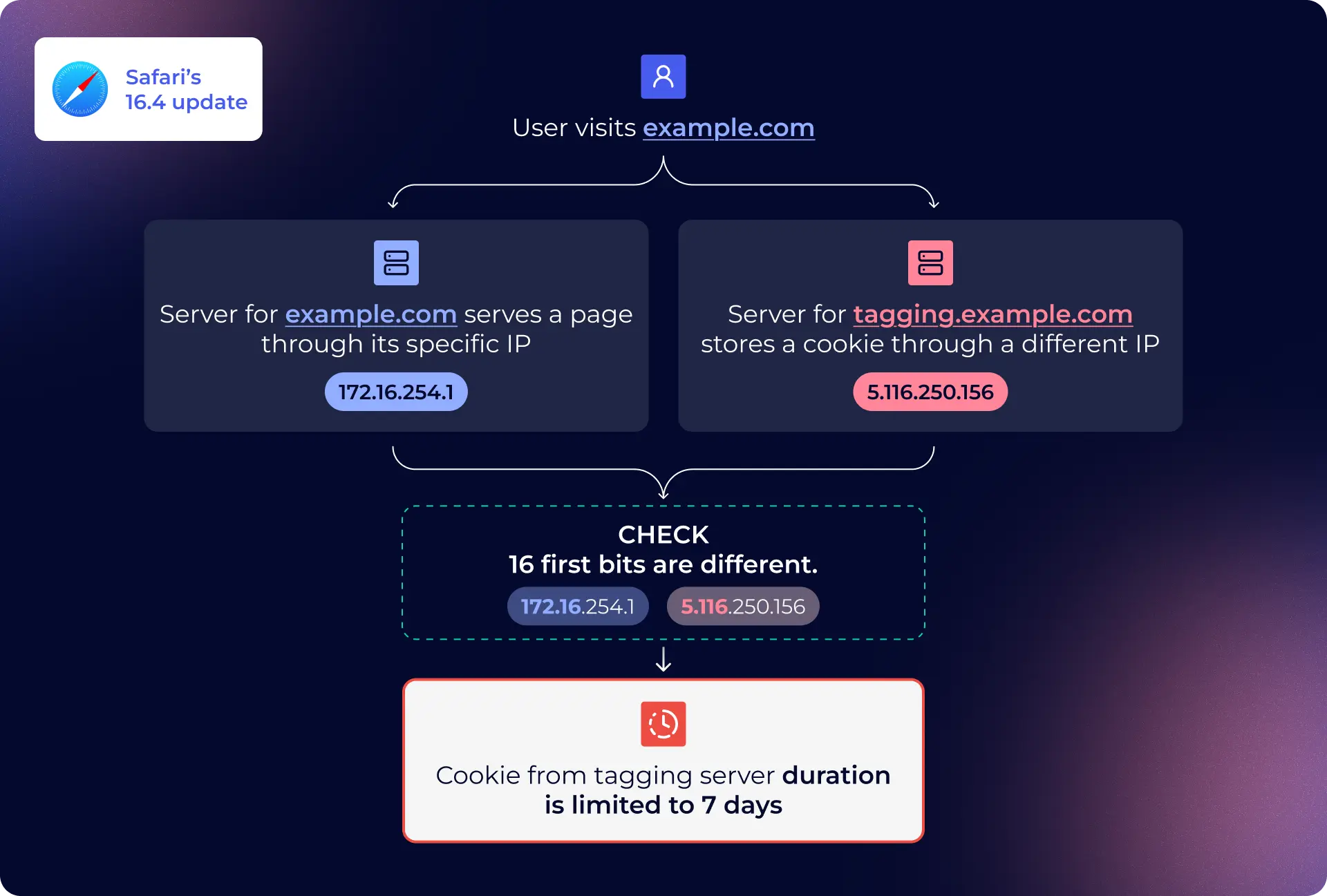
- 2023, Safari 16.4: Extended the same limit to cookies set by a tracking server whose IP address does not match your website’s IP address.
Server-side tagging remains a solid foundation, and since the 16.4 update, it needs one more condition to keep cookies alive. The details are explained in the next section.
What changed in Safari 16.4?
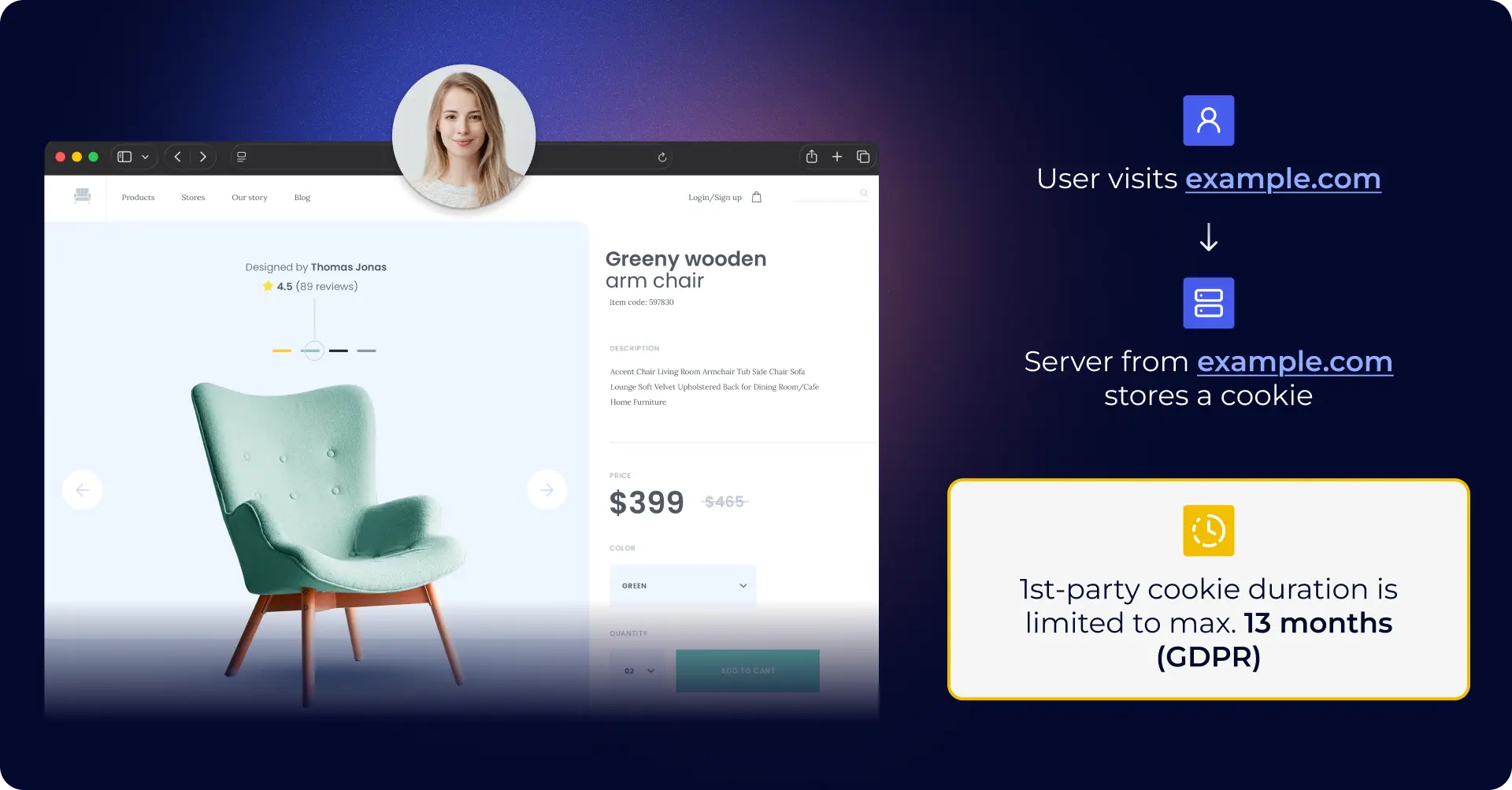
A cookie set by your website’s server (example.com) is considered legitimate from Safari’s perspective and has a set maximum lifespan.
The main job of a tracking server is to collect user activity data and pass it on to an analytics platform and a cookie can also be set by this tracking server (operating your tracking subdomain like tagging.example.com). Safari conducts a verification by comparing the IP addresses of your website server and the tracking server. If the two IPs differ, the browser restricts the cookie set by your tracking server to one week at best. In short, the cookie that identified the user expires after seven days without a visit.
To understand the process better, you can refer to the following visuals.
This shows the server behind your website sets a cookie, and it can last up to its maximum. Here, we use 13 months, the CNIL’s guidance in France, as an example:
The diagram below shows that, in Safari’s 16.4 update, if the tracking server’s IP address differs from your website’s, its cookie is capped at seven days:
How does this change in measurement affect your business?
When Safari’s cookie expires between two visits, your analytics records two different people: one who clicked the ad but never purchased the product, and another who bought the product randomly.
This anomaly can cause multiple issues for you:
- Acquisition and retention: With visitors who return after a week being considered new by the browser, the rates of returning-user fall while new web traffic count rises, causing each buyer to look like a one-time customer. Customer lifetime value (CLV) can come out lower than reality.
- Attribution and budget distribution: The ad click, the research visit, and the purchase become part of different journeys, leading to a distorted multi-touch attribution (MTA). This leads to conversions being credited to the wrong sources or none at all, and your teams can end up cutting back on channels that actually reach the users.
- Ad platform optimization: If returning Safari users are unrecognized, the platforms like Google Ads and Meta that rely on the data you send find fewer matched conversions and optimize on an incomplete or incorrrect information.
Since none of this counts as an error, the data shows a distorted version of your performance. We call this dead-end data, where your analytics tools can’t measure user activity accurately because of browser tracking protections.
What Addingwell offers to solve Safari’s cookie limit problem
To keep the cookie’s lifespan at its maximum, you need either matching IP addresses or a way to restore the cookie when it expires after the seven-day period. Addingwell helps you set up both solutions, depending on your infrastructure.
Option 1: Reverse Proxy DNS
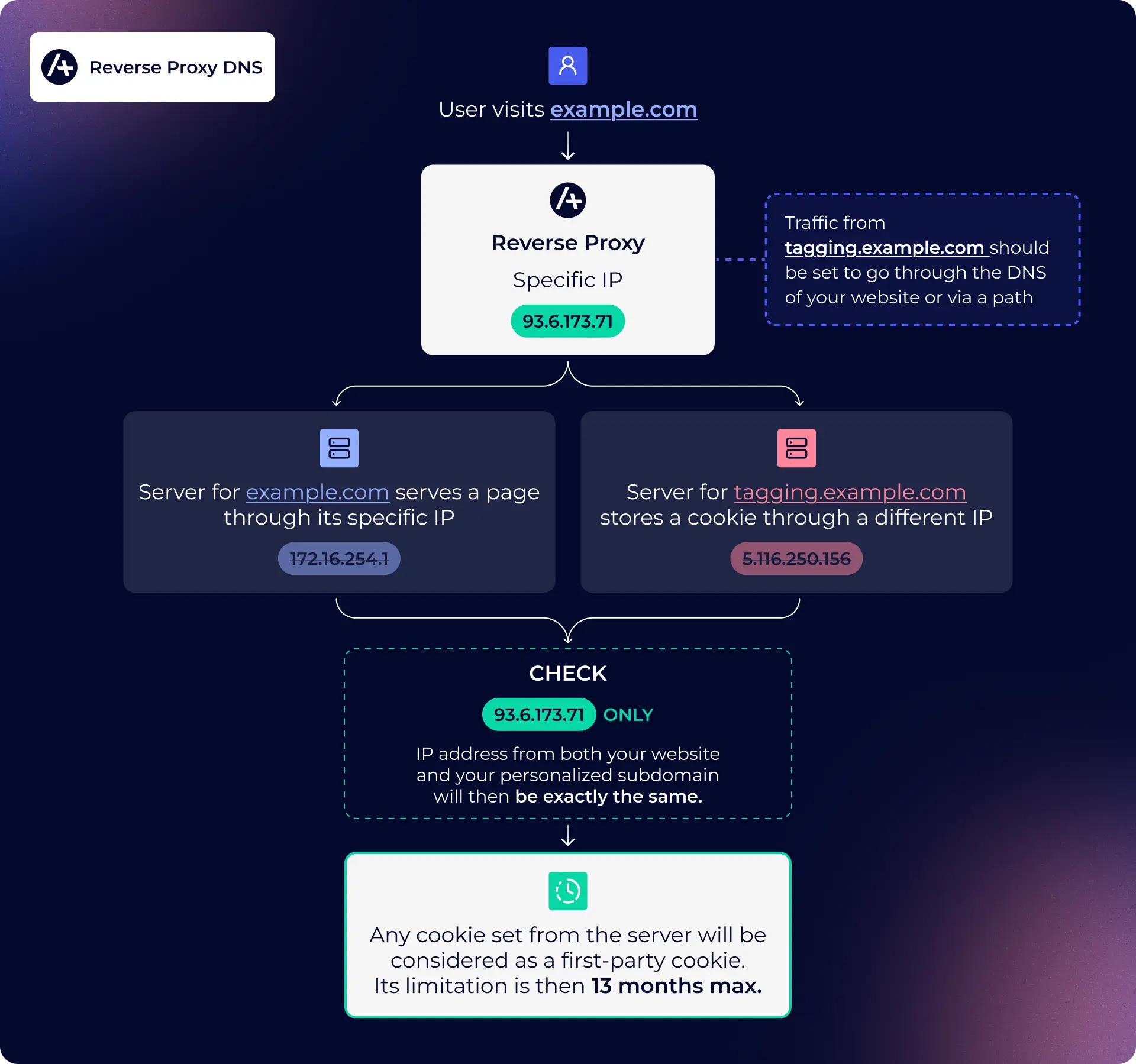
A reverse proxy forwards the data your site would send to your tracking server through your website’s own domain first. When Safari verifies the IP addresses, it only sees the proxy IP address, and since there is no IP mismatch, Safari treats the cookies as being set directly by your website. As a result, they keep their lifespan and are not limited to seven days.
This is the recommended option if you already use Cloudflare, and we have implementation guides as well for CloudFront, Akamai, Google Cloud, NGINX, Apache, and Fastly. Any other provider that fits the criteria detailed in our documentation can also use this approach.
You can refer to the illustration below to understand the process of the Reverse Proxy DNS method better:
Option 2: Cookie Restore
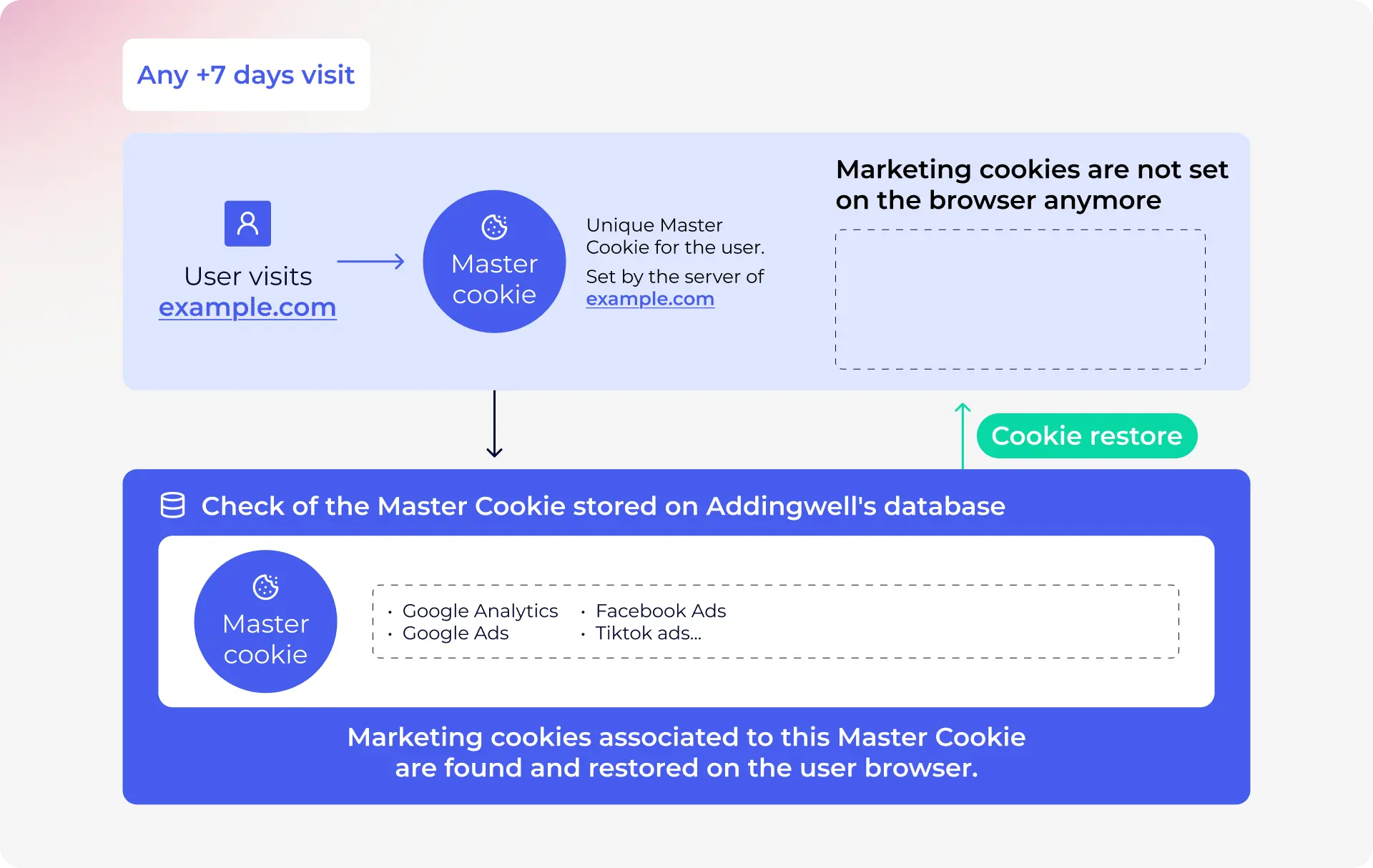
If you cannot put a reverse proxy in front of your site because your hosting platform (example: Shopify) doesn’t let you control the domain’s proxy, the Cookie Restore approach allows the cookies to be revived after they expire.
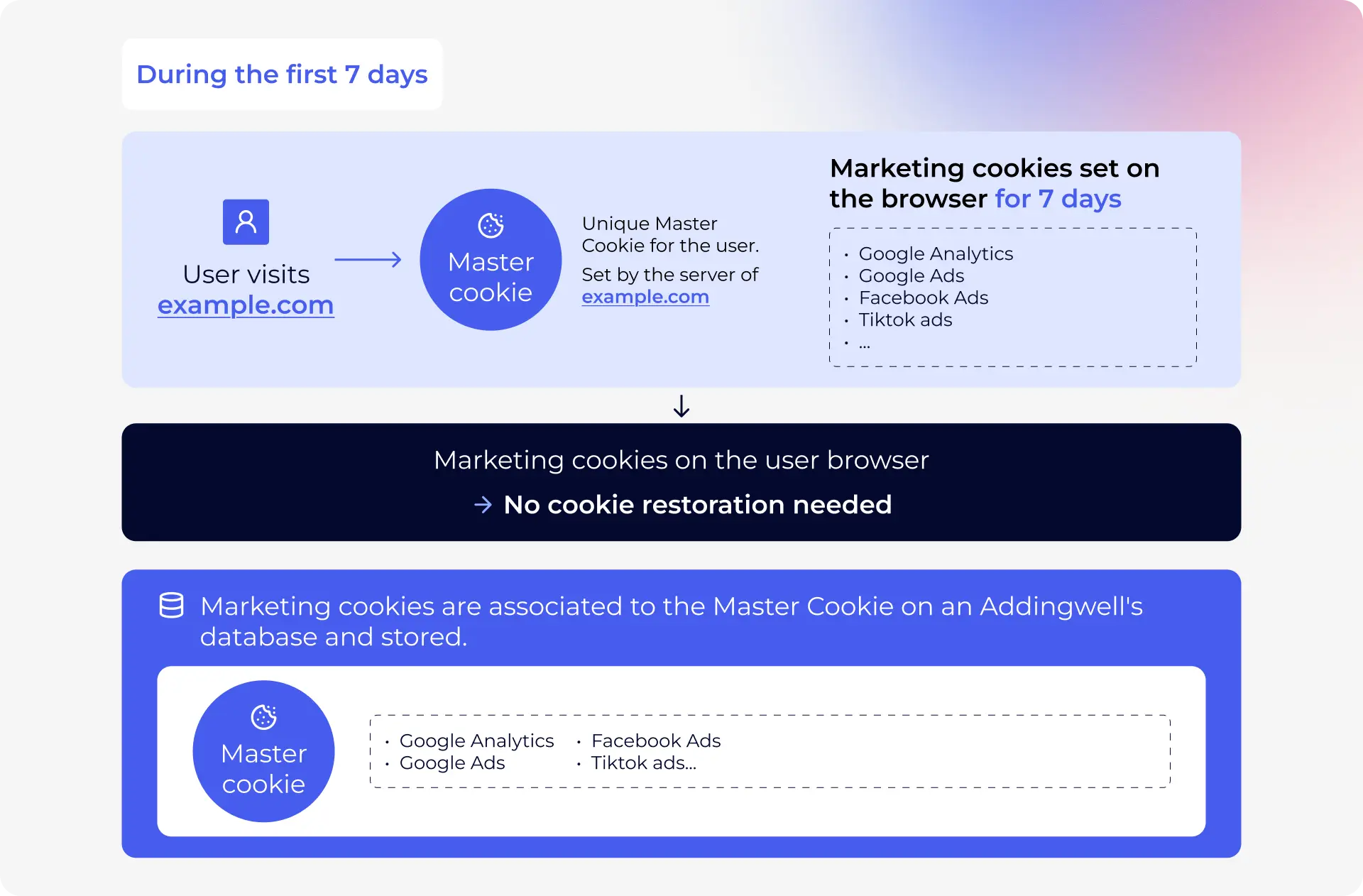
A unique, stable identifier, a “Master Cookie”, is set by your website's server, which remains unaffected by Safari’s limit and is readable across your website domain and subdomains.
On the first visit, your website’s server sets a Master Cookie (we recommend doing it after consent has been collected). When the tracking server receives a request, Addingwell stores which marketing cookies belong to that Master Cookie. After Safari deletes the marketing cookies at the seven-day mark, the next request still carries the Master Cookie, so Addingwell looks up the stored cookies and sets them again.
Addingwell provides ready-made Master Cookie implementations for PHP, Node.js, WordPress, PrestaShop, Magento, and through a dedicated app for Shopify. Once set, you can verify your Master Cookie implementation through an automated check available in the Addingwell interface that verifies it is server-set, first-party, and unique per visitor before activation of the feature.
The diagrams below show how Cookie Restore links a master cookie to your marketing cookies, so they can be put back after Safari deletes them on day seven:
How Addingwell customers handled Safari’s ITP update
Safari’s cookie limit looks different for each business, and so does the fix. Here is what some of Addingwell's customers measured:
- Oscaro, a French online retailer of automotive spare parts, checked results before and after the setup change. More than one in four of its “new” Safari visitors were returning visitors, but were being recounted. This is far from marginal as iOS traffic beyond eight days accounts for around 40% of Oscaro’s total traffic, roughly the same as Chrome. After setting its GA4 cookie through Addingwell, new Safari visitors fell by 27% because returning visitors were no longer being counted as new.
- myBlend, a beauty brand, migrated from WooCommerce to Shopify and needed to continue tracking returning visitors. It activated Addingwell’s Cookie Restore to overcome the platform’s sandbox limits, which allowed myBlend to recover lost cookies. The brand reports that 43% of its returning visitors on Apple devices came back after eight days, contributing to the +200% revenue growth.
Each of these customers looked at something different: one tracked new visitors, while another tracked returning visitors. However, they all share the same cause: cookies expiring too soon.
Explore other Addingwell customer stories to see how they improved the reliability of their data.
What’s next for Safari and server-side tracking?
Cookie lifespans are only one layer of Safari’s privacy protection system. Safari 27, released in September 2026, adds another layer: Safari now blocks network access to third-party companies that turn email addresses into IDs that track people across websites. This brings different consequences for measurement.
We keep a close watch on updates like these, and add more developments to Addingwell’s solutions as the challenges evolve. We will be back with more on Safari 27, but in the meantime, you can learn how Addingwell offers both solutions, depending on your setup, in our documentation.
If you have any questions related to server-side tracking, get in touch with our team.
The author