How to set up Meta Conversions API (CAPI): The complete guide
Vlad Popovici, Senior Performance Marketing & SEO Manager at Didomi, explains how Meta CAPI recovers the conversions your pixel is missing and why server-side tracking is no longer optional.


The Meta Pixel was built in 2013, when third-party cookies were the default and browsers shipped tracking out of the box. Apple's iOS 14.5 in 2021 ended that when App Tracking Transparency hit iOS apps and Safari kept tightening on the web.
Apple's Intelligent Tracking Prevention (ITP), introduced in Safari in 2017 and tightened over successive iterations, progressively dismantled that model on the web, while App Tracking Transparency extended the same logic to iOS apps.
In 2021, Apple released App Tracking Transparency. Most users opted out and Meta lost visibility into mobile conversions overnight. Aggregated Event Measurement followed shortly after, capping how many events any pixel could prioritize.
Today, Safari has blocked third-party cookies by default since 2020, with first-party cookies set via JavaScript expiring after just 7 days. Link Tracking Protection strips fbclid from URLs in Mail, Messages, and Private Browsing since iOS 17, Firefox blocks trackers out of the box, and 15 to 20% of desktop users in Western markets run an ad blocker.
Fast forward to 2026, Apple started stripping fbclid from URLs in Mail, Messages, and Private Browsing, Safari stopped using third-party cookies, Firefox blocks trackers by default, and roughly 25-40% of desktop users now run an ad blocker.
Running in the browser means anything that can interfere with the browser breaks your pixel.
Purchases happen on your store, but Events Manager shows fewer of them than your backend reports, so you start missing add-to-cart, checkout and purchase events.
The Meta Conversion API (CAPI), formerly known as Facebook Conversions API is how you can get your data back, track more conversions and be able to attribute wins to the right campaign.
What is Meta CAPI (Conversion API)?
Meta CAPI is a server-side endpoint that takes conversion events straight from your infrastructure and hands them to Meta, skipping the browser entirely. It sits behind your site and posts the same events over HTTPS, server to server, where no browser restriction applies.
Players like Meta started publicly explaining that Apple had removed third-party cookies, that campaign performance had degraded, and that advertisers needed to shift toward server-side.Meta released an API that’s compatible with Google Tag Manager, and therefore with Addingwell. When advertisers spoke with their Meta account managers, they were encouraged to implement CAPI (Conversions API), which requires a server-side setup.-
Romain Baert, Manager server-side tracking at Addingwell by Didomi (source: Didomi blog)
Meta CAPI vs Meta Pixel: What's the Difference?
The Meta Pixel is JavaScript on your site sending events from the user's browser to Meta. Meta CAPI is a server-side API sending the same events from your backend to Meta.
They solve different failure modes, which is exactly why Meta wants you running both.
The Meta Pixel still wins on real-time browser signals when cookies make it through. Meta CAPI picks up the events the Meta Pixel never sees.
How Meta CAPI Works
Meta CAPI (Conversions API) is a server-to-server channel that sends events directly from your infrastructure to Meta, replacing the browser as the messenger. Here's exactly how it works:
1. An event happens on your store
When a shopper completes a purchase, your backend now holds everything Meta cares about:the order ID, the value, the currency, the products, plus the customer's email, phone, IP, user agent, and Facebook click ID (fbc) and browser ID (fbp) cookies if they're available.
2. Your server packages the event
Before anything leaves your infrastructure, the personally identifiable fields get hashed using SHA-256. Email becomes a 64-character string. Phone becomes a 64-character string. Meta receives only hashed values, which it then matches against its own hashed user database to identify the buyer.
The package now contains:
- Event data (event name, event time, event ID, event source URL, action source)
- Customer data (hashed email, hashed phone, IP, user agent, fbc, fbp, hashed name, hashed city)
- Custom data (order value, currency, content IDs, content type, number of items)
3. The event is sent to Meta's CAPI endpoint
Your server makes an authenticated HTTPS POST to graph.facebook.com/v{version}/{pixel_id}/events, with your access token in the header. Meta receives it within milliseconds and acknowledges it.
The browser is never involved, so ad blockers, ITP, Firefox tracking protection, and slow page loads have no effect on whether Meta gets the signal.
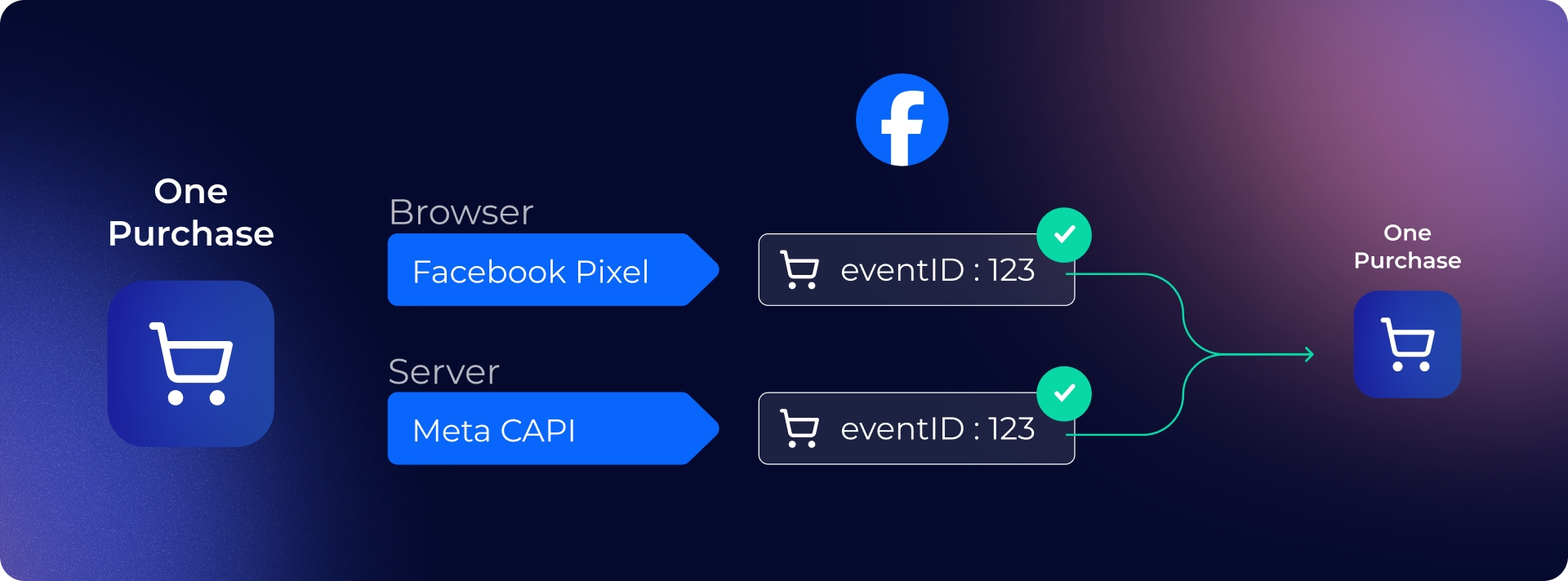
4. Deduplication with the pixel
Most setups run the pixel and CAPI in parallel for redundancy. Meta deduplicates using two fields you must send identically from both sources:
- event_id: a unique ID for that specific transaction (typically the order ID)
- event_name: must match (e.g., both say "Purchase")
When Meta sees the same event_id from the pixel and CAPI, it counts the conversion once. If the pixel was blocked, CAPI still delivers it. If both arrive, Meta keeps the richer of the two payloads.
5. Meta uses the new data
Once Meta has the customer data, it matches the event to a real user profile, which then powers everything downstream.
Event Match Quality (EMQ), scored 0-10, reflects how confidently Meta could tie the event to a known user, and that score directly shapes how much weight the conversion carries. EMQ rises when you send more customer identifiers with each event
Smart Bidding starts optimizing against the full conversion set rather than a partial one, so bids land on real buyers. Attribution credits the right ad, audience, and click.
Lookalike and retargeting audiences refresh against accurate buyer behavior, so the people Meta serves your ads to actually resemble your customers.
Why Meta CAPI Matters For Your Business
The pixel was designed for an internet that no longer exists, one without Safari ITP, without Firefox blocking trackers by default, without 25-40% of users running ad blockers.
Advertisers are investing heavily in attribution tools or in CDPs for segmentation and retargeting. But under the surface, the data is steadily deteriorating. You can't invest so much in martech if the data isn't reliable.
Romain Baert, Manager server-side tracking at Addingwell by Didomi (source: Didomi blog)
Here's how the Meta CAPI improves your campaign performance:
Restoring the missing conversions from the Meta Pixel
Every checkout that gets blocked in the browser still happens on your backend. The Meta CAPI sends those events directly from your server, so Meta sees the full picture rather than the 60-80% the pixel manages to deliver.
Improving Smart Bidding via clean data
Meta's algorithm only optimizes against what it sees. With the Meta CAPI, it trains on real conversions, so bids land on real buyers, ROAS reflects reality, and the ad performance panic usually goes away on its own.
Enhancing Event Match Quality (EMQ)
The Meta CAPI lets you send hashed email, phone, IP, and user agent server-to-server. That dramatically raises the share of events Meta can confidently match to a user, which feeds better attribution, more precise lookalikes, and stronger retargeting audiences.
Capturing events browsers miss
Refunds, subscription renewals, customer service cancellations, post-purchase upsells, in-store conversions. The Meta CAPI sends them whenever they happen, from any system that has the data.
Future-proofing your Meta setup
Every browser release tightens privacy further and a pixel-only stack means rebuilding tracking every few months. Meta CAPI runs server-to-server, so browser changes pass through without breaking anything.
Real-World Results: How Damart Recovered Lost Meta Conversions
Damart, a major European retailer, was running into the same problem, 45% of their site traffic was unmeasured, Meta was receiving only 55% of actual conversion data, and attribution was off by 64% against their internal benchmarks.
Working with Addingwell, Damart migrated to a server-side tracking architecture across five countries in two to three months.
These are the results after their migration:
- +27% more conversions attributed to FacebookAll events the Pixel was losing to ad blockers and Safari ITP now reach Meta server-to-server
- +16% more data collected overallAcross every connected platform, not Meta alone
Read the full Damart case study
Who Needs Meta CAPI?
Not every organization requires Meta CAPI. The companies that will benefit most in investing time and energy into Meta's endpoint are:
Clients spending more than €3K/month on Meta ads
Signal loss maps straight to CPA increase. At that spend level, pushing EMQ from the 6 to 8 typically pays for the tooling twice over in the first month.
Ecommerce with checkout using their own domain
Shopify, WooCommerce, Magento, and custom stacks all leak conversion data to Safari and ad blockers. Meta CAPI recovers the high-intent events (Purchase, InitiateCheckout, AddToCart) that matter most for Meta Advantage+ Shopping Campaigns (ASC) bidding.
Lead-gen accounts with long funnels
B2B, SaaS, finance, education, any vertical where the conversion lands after a form fill or later CRM qualification. The Meta CAPI lets you send downstream events (SQL, opportunity, closed-won) back to Meta, events the Meta Pixel can't reach because the real conversion happens hours or weeks after the click.
How to Set Up Meta CAPI with Addingwell (The easy way)
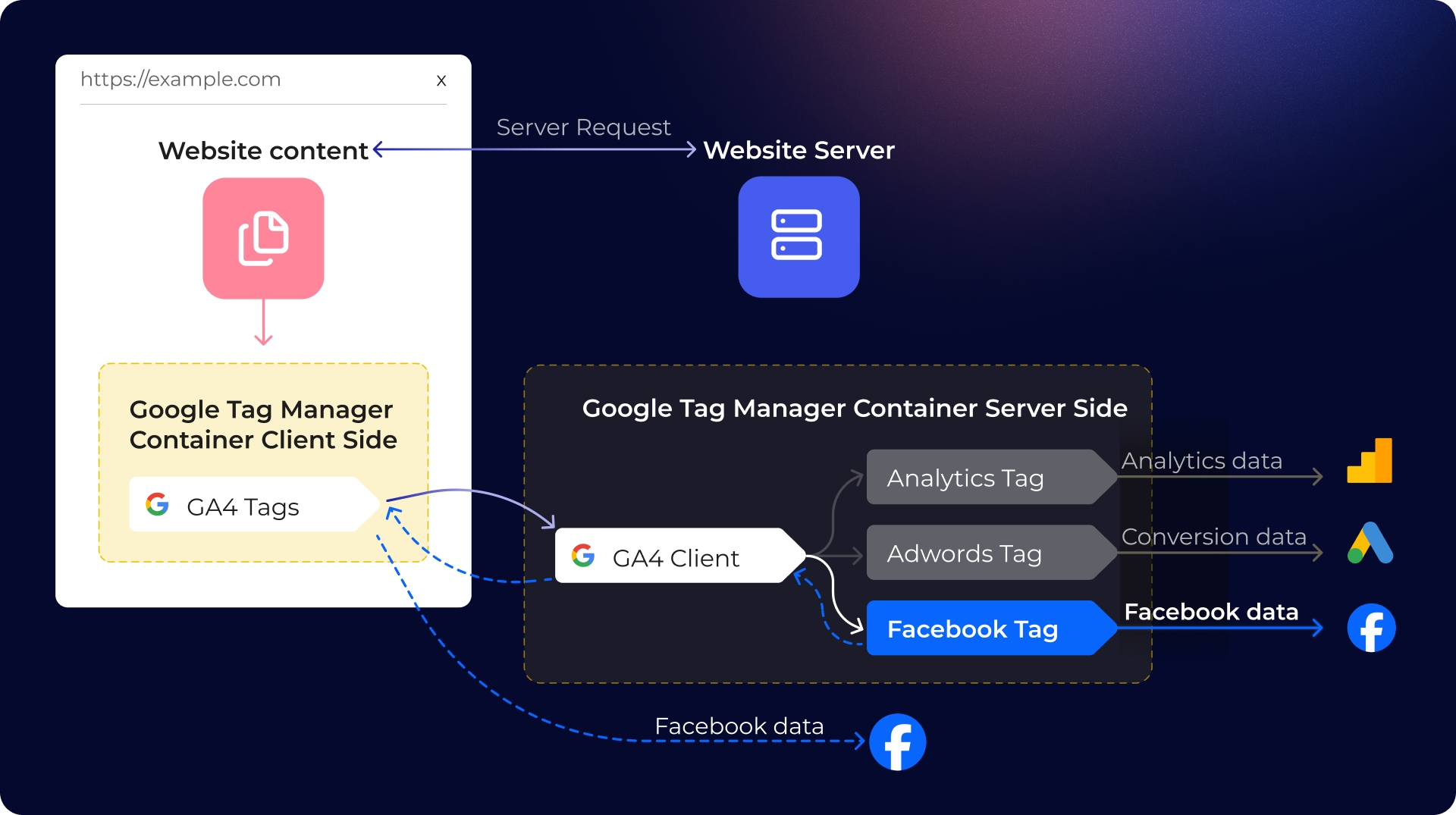
Assuming you already have a web GTM container with a Facebook Pixel already firing, here's how the Meta CAPI set up looks like with Addingwell:
Step 1: Spin up an Addingwell container
Sign in, create a workspace for the client, connect it to an existing server-side GTM container or let Addingwell provision one for you. The workspace handles hosting, SSL, the custom domain (data.client.com), and uptime.
Step 2: Point the web GTM at the Addingwell endpoint
Update the GA4 configuration tag's server_container_url to the Addingwell subdomain. Events now flow: browser → Addingwell server → downstream platforms.
Step 3: Install the Addingwell Meta CAPI tag
From the server container's template gallery, add the Addingwell Meta CAPI tag.One tag handles both the browser Pixel request and the server-side CAPI call, with matching event_id values generated for you.
Step 4: Map your events
Point the tag at the events that matter: Purchase, Lead, AddToCart, InitiateCheckout.The tag reads the client's existing GA4 event parameters and translates them into the format CAPI expects, including the user identifiers that drive EMQ.
Step 5: Wire consent
If the client runs a consent management platform, Addingwell's consent integration reads the user's choice and suppresses events when consent is missing. No custom JavaScript.
Here's the full guide on how to set up consent with sever side GTM.
Step 6: Verify your setup
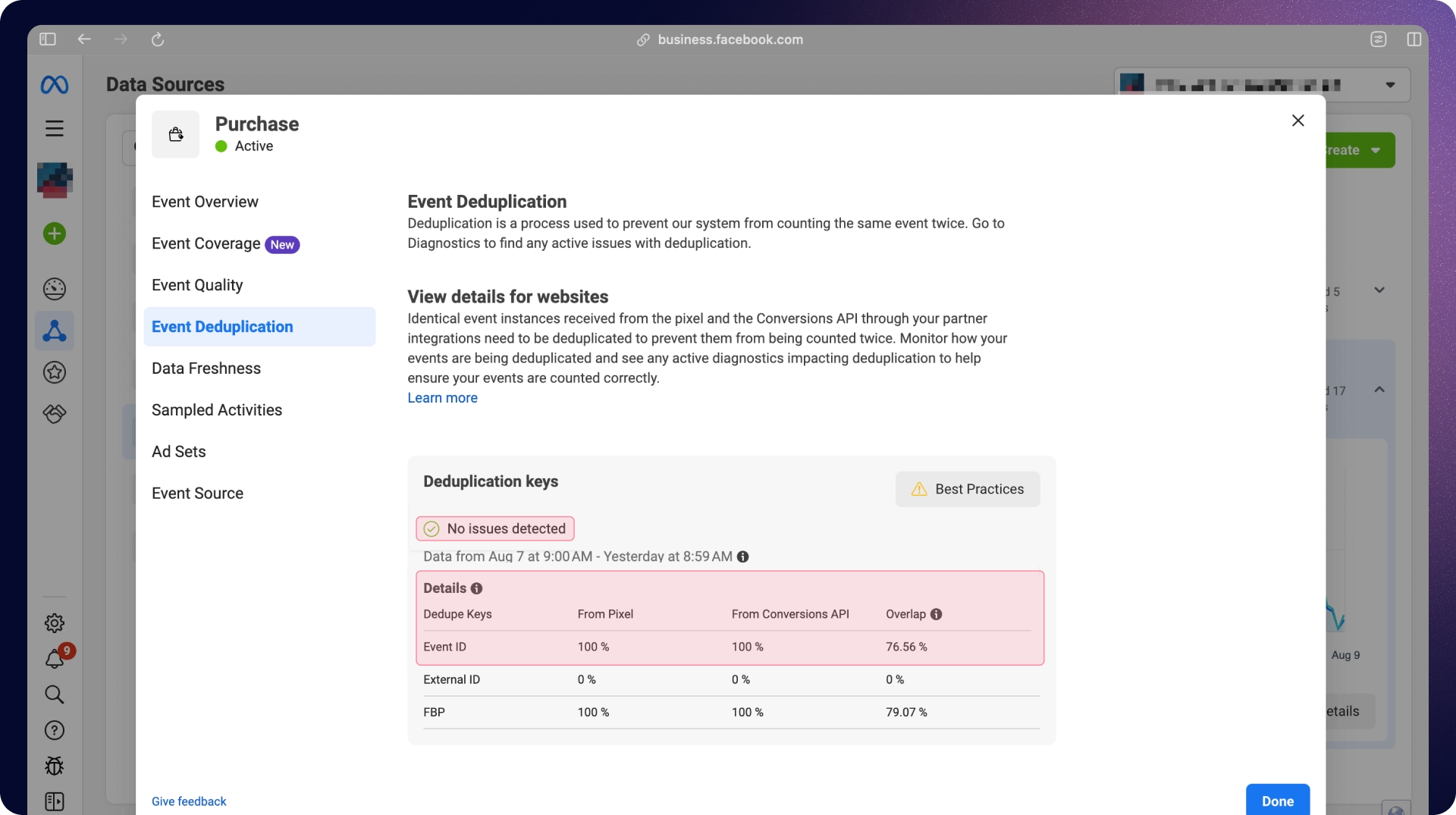
Meta's Events Manager test events tool and the Dataset Quality API confirm events are landing, dedup is working, and EMQ sits in the target range.
Addingwell's monitoring dashboard pages you the moment events drop, which is usually before the client notices. If you'd like to dive deeper into the technical setup, you can read the full documentation for the Meta CAPI Setup with Addingwell.
The DIY Version: How to Set Up Meta CAPI (not actually free)
There are ways to ship meta CAPI without paying a vendor. However, keep it mind that while it can look enticing, it generally doesn’t end up being free.
Version 1: Using Meta's CAPI Gateway
Meta runs a hosted gateway on AWS that handles the server-to-server piece. Sign up in Events Manager, connect the dataset, and follow the prompts.
Hidden costs
The Gateway itself is free to provision, but you own the AWS account behind it, which means:hosting costs (typically €5–€30/month per client at normal traffic), IAM setup, security patches, and debugging when Meta updates the underlying spec.
Limited tagging services
The Gateway also supports a narrower slice of use cases than full server-side tagging. Meta only. No GA4 routing. No Google Ads server-side. No TikTok. No LinkedIn. If a client runs Meta and only Meta, forever, the Gateway works.
Version 2: Self-hosted server-side GTM
You can build this yourself. Spin up a tagging server on Cloud Run, point a subdomain at it, install the Meta CAPI tag from Google's template gallery, plug in your access token, write the deduplication logic, and you're live.
Hosting costs about €10-€50/month for a single server. Google's own production guidance is three servers for high availability, which lifts the floor to ~€120/month per account before monitoring and on-call. Across a 10-account book, you can see how this quickly becomes a small SaaS operation.
The technical knowledge is free. Simo Ahava, and Meta's own docs cover every step.
The drawbacks of having to become the owner of the setup are:
- Scaling the server through Black Friday traffic spikes
- Rotating access tokens before they expire
- Updating consent logic every time the client's CMP changes versions
- Patching when Meta's SDK changes
- Debugging the random issues when EMQ drops
- Explaining to the agency CFO why GCP charges keep showing up
Meta CAPI Setup Compared
Meta CAPI Parameters Reference
The quality of your Meta CAPI implementation comes down to the parameters you send with each event. If you send too few and your Event Match Quality tanks. Format them wrong and Meta rejects the event.
Here's the full reference, grouped by the four blocks Meta expects:
Required event parameters
These three must be present on every event, or Meta drops it.
- event_nameThe standard event name (Purchase, AddToCart, Lead, ViewContent, InitiateCheckout, AddPaymentInfo, CompleteRegistration). Custom events are allowed but lose access to a chunk of Meta's optimization features.
- event_timeUnix timestamp of when the event happened. Meta accepts events up to 7 days late, but anything beyond an hour bleeds optimization value.
- action_sourceWhere the event originated. website for browser-based events, system_generated for CRM and backend events, *physical_store for in-store, app *for mobile app events. Get this wrong and Meta misclassifies or rejects.
User data parameters that boosts EMQ
These live inside the user_data object. Every PII field must be SHA-256 hashed after normalizing (lowercase, trim whitespace, E.164 phone format).
- emHashed email. The single highest-impact parameter on the list. Adding it pushes EMQ up by roughly 4 points.
- phHashed phone in E.164 format (example: +13612345678→ hash). Worth around 3 EMQ points.
- fn / lnHashed first name and last name, lowercased.
- ct / st / zp / countryHashed city, state, zip, country code.
- external_idYour internal customer ID, hashed. Helps Meta keep identity stable across sessions.
- client_ip_addressPlain text, captured from the request. Don't hash.
- client_user_agentPlain text. Don't hash.
Browser identifiers should not be hashed
These two are the most common implementation failure point. Both must be sent in plain text, because hashing breaks Meta's ability to match the server event to the browser session.
- fbpThe browser ID Meta sets in the _fbp first-party cookie. Format: fb.1.[creation_timestamp].[random_number]. Read it from the cookie on your server and pass it through unchanged.
- fbcThe click ID Meta appends as fbclid when a user clicks an ad. Format: fb.1.[creation_timestamp].[fbclid_value]. Only set fbc when a real fbclid exists in the URL. Fabricating it degrades data integrity and Meta will catch it.
Custom data parameters
These describe the conversion itself.
- value - Numeric value of the conversion.
- currency - Three-letter ISO code (USD, EUR, GBP).
- content_ids - Array of product IDs for catalog events.
- content_type -product or product_group.
- content_name / content_category - Optional, but lift event richness for ASC bidding.
- num_items - Quantity in the order.
- order_id - Useful as the source of your event_id for deduplication.
How to Improve Your Event Match Quality (EMQ)
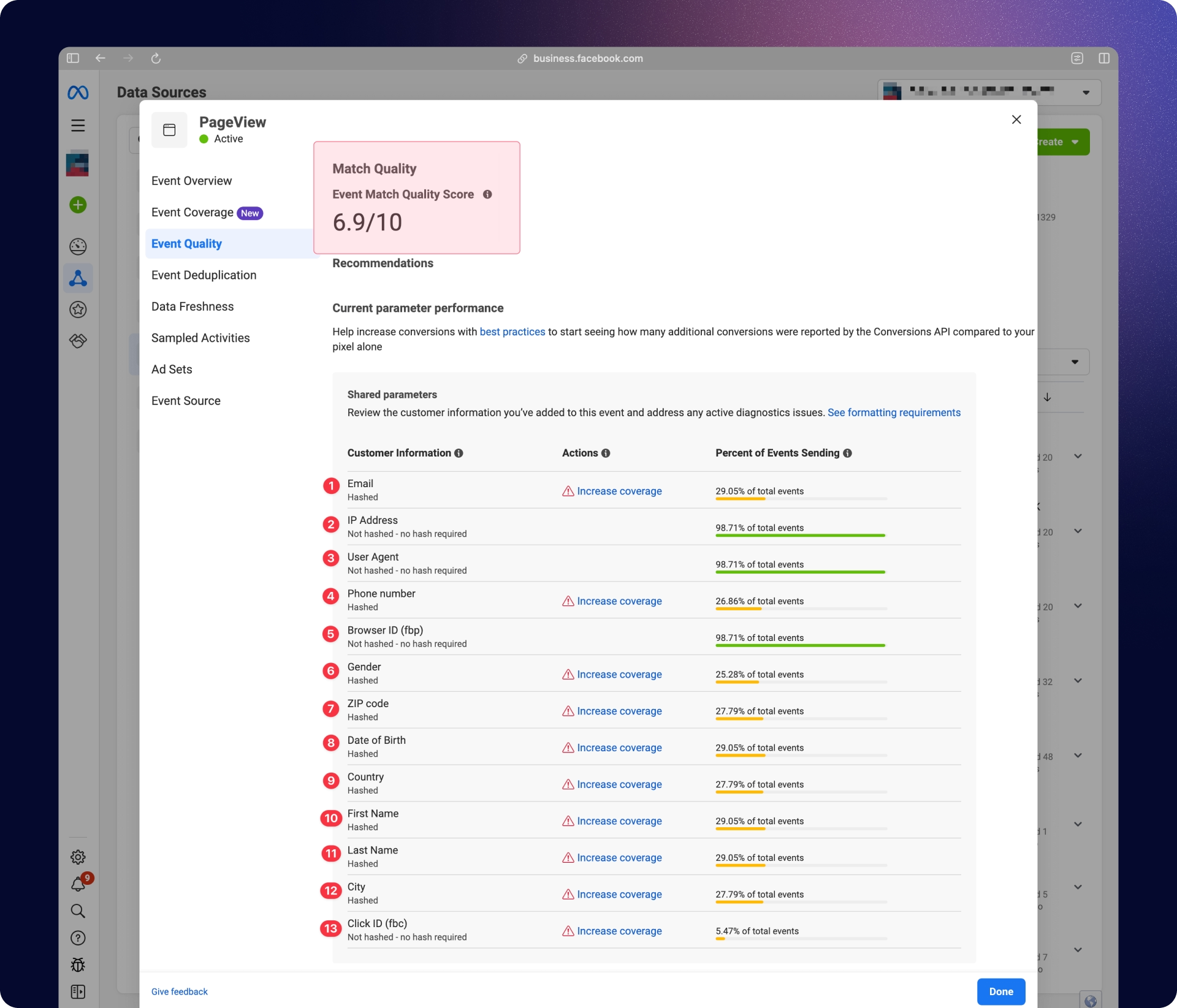
Event Match Quality is Meta's 0-to-10 confidence score for how well it can tie a Meta CAPI event to a real Facebook profile. It updates every 48 hours in Events Manager, and the score directly influences how much weight the conversion carries in Smart Bidding, lookalike audiences, and attribution.
Target Event Match Quality scores by event type
Different events carry different identifier richness, so the targets differ.
- Purchase: 8.8–9.3. The user just gave you their email, phone, and address.
- AddToCart: 8.0+
- InitiateCheckout: 7.5+
- Lead: 7.5+, depending on the form
- PageView: 6.5–7.5. The user has not handed over personal data yet, so matching is inherently weaker.
The highest-impact levers for Event Match Quality scores
- Send hashed email on every event where you have it. This is the single biggest move, typically +4 EMQ points.
- Send hashed phone in E.164 format. Typically +3 EMQ points.
- Include fbp and fbc unhashed. Connects server events to browser sessions.
- Send multiple identifiers together. Email + phone + external_id + fbp + fbc on the same event matches more confidently than any single field alone.
- Turn on Advanced Matching in the Pixel. It captures additional form-field data automatically and supplements your CAPI payload.
Common Meta CAPI Setup Mistakes to Avoid
Hashing fbp and fbc
These two cookie values must be sent in plain text. They are not personally identifiable information and Meta uses them as session matching keys, not user identifiers. Hashing them breaks Meta's ability to connect your server event to the browser session it came from, which tanks your EMQ.
Mismatched event_id causing double-counting
If the event_id in your Pixel call doesn't exactly match the event_id in your CAPI request; including casing and whitespace, the deduplication fails.Meta counts both events. Your reported conversions double, your bidding algorithm chases non-existing revenue, and it takes longer to rollback than the original setup would have taken to do the setup correctly.
Forgetting to capture fbclid for downstream CRM events
If you plan to send CRM events through CAPI (qualified lead, demo booked, closed-won), you must capture the fbclid parameter from the landing page URL at the moment of initial form submission and store it with the contact record. Meta cannot attribute the downstream CRM conversion back to the original ad click without it.
Using the wrong action_source
Website events use "website". CRM and backend events use "system_generated". In-store or offline events use "physical_store". Using the wrong value causes Meta to misclassify or reject events entirely.
Sending events with significant latency
The Meta CAPI accepts events up to 7 days after they occur, but events sent hours or days later provide meaningfully less optimization value. Meta's algorithm needs signals close to real-time to bid efficiently. So send your events within minutes of the conversion.
Running Pixel + CAPI without deduplication
If you fire both without matching event_id values, every conversion gets counted twice. Smart Bidding starts optimizing against a dataset that's twice the size of your real one, CPAs look artificially low, and ROAS looks artificially high.
Conclusion: The pixel-only era is over
Today, server-side already enables up to 20% ROAS optimization, even with third-party cookies still active on Chrome. That's huge.
Romain Baert, Manager server-side tracking at Addingwell by Didomi (source: Didomi blog)
The Meta CAPI helps capture missing conversions, lifts Event Match Quality so Smart Bidding can start optimizing for real buyers.
The setup itself is not that difficult, however, the maintenance part is the one teams underestimate. Having to deal with token rotations, CMP version changes, Meta SDK changes, scaling and EMQ drop events make a managed solution much more feasible.
That’s why Addingwell exists.
Get started with Addingwell for free and have Meta CAPI live for one Meta dataset by the end of the day (first 100k requests free).
Read the full Meta CAPI documentation for the complete technical reference: parameter mapping and benefits, consent with server-side GTM, EMQ verification, and the dataset quality checklist.
Meta CAPI FAQs
What is Meta CAPI?
Meta CAPI (Conversions API, formerly Facebook Conversions API) is a server-to-server endpoint that sends conversion events from your infrastructure to Meta without going through the user's browser. It recovers the conversion data the Facebook Pixel loses to ad blockers, Safari's ITP, and other browser-level restrictions.
Do I need both the Meta Pixel and Meta CAPI?
Yes, in almost every case. Meta's current guidance is dual tracking: run the Pixel for real-time browser context and CAPI for server-side reliability. The two together, with matching event_id values for deduplication, give you the most complete signal and the strongest campaign optimization.
How long does Meta CAPI setup take?
With a managed platform like Addingwell, a marketer comfortable in GTM can ship Meta CAPI in two to four hours per account, no developer required. A self-hosted server-side GTM setup typically takes one to two days of an analytics engineer's time, plus ongoing maintenance. Meta's own CAPI Gateway sits in between at one to three hours, with some AWS setup involved.
Is Meta CAPI free?
The API itself is free. Meta charges nothing for sending events through it. Shipping it requires infrastructure, which costs money or time. Meta's CAPI Gateway costs AWS hosting. Self-hosted server-side GTM on Google Cloud runs €10-€50/month at low traffic and €120+/month for production-grade availability. A managed platform like Addingwell bundles hosting, tags, consent, and monitoring into a single subscription and you can get started for free.
What is Event Match Quality (EMQ) in Meta CAPI?
EMQ is Meta's 0-to-10 score measuring how confidently Meta can match your CAPI events to Facebook user profiles. Higher EMQ means better delivery and stronger lookalikes. Commonly cited targets: 6.5–7.5 for PageView, 8.0+ for AddToCart, and 8.8–9.3 for Purchase. Sending hashed email, hashed phone, fbc, fbp, client_ip_address, and client_user_agent on every event pushes EMQ up fastest. Hashed email moves the number more than any other field.
How does Meta CAPI deduplication work?
When both the Pixel and CAPI fire for the same conversion, you attach an identical event_id to each event. Meta receives both, matches them by event name and event ID, and counts them as a single conversion. Skip this step and your reported conversions double, ASC starts chasing phantom revenue, and the numbers take longer to unwind than the original setup would have taken to ship correctly.
Does Meta CAPI work with Shopify?
Yes. Shopify has a native Meta CAPI integration for basic use cases. For clients that need cross-platform routing (Google Ads, TikTok, LinkedIn), custom event logic, or consent-aware deduplication across both Pixel and CAPI, a full server-side tagging setup through Addingwell gives more control than Shopify's built-in connector.
Does Meta CAPI handle user consent?
Meta CAPI doesn't handle consent by itself. You need a CMP (consent management platform) to capture the user's choice, then conditionally fire or suppress CAPI events based on that choice. Addingwell natively integrates with Didomi and most major CMPs. Self-hosted setups require writing this logic yourself.
What's the difference between Meta CAPI and Meta's CAPI Gateway?
Meta CAPI is the API itself, the endpoint you send events to. Meta's CAPI Gateway is a hosted no-code wrapper Meta provides to simplify the server-to-server connection. The Gateway runs on your AWS account, supports Meta only (no other platforms), and fits advertisers who want a simple Meta-only setup. Full server-side tagging platforms like Addingwell support Meta CAPI plus GA4, Google Ads, TikTok, LinkedIn, and more from a single infrastructure.
Will Meta's April 2026 "one-click CAPI" announcement replace server-side tagging?
For small advertisers running only Meta with standard events, the one-click option is likely enough. For any client with meaningful spend, custom events, cross-platform tracking, or serious consent requirements, full server-side tagging still offers more control, better EMQ, and routing flexibility the one-click option doesn't cover.
What happened to Meta's Offline Conversions API?
Meta discontinued it in May 2025. All offline events now go through CAPI with action_source: physical_store or system_generated.
The author