How to Track Conversions Accurately on OpenAI Ads Using Server-Side Tracking
Simon Camus, Technical Support Engineer at Addingwell by Didomi, explains how server-side tracking improves conversion accuracy for OpenAI Ads.

Earlier this year, OpenAI started its advertising operations, and businesses are flocking to figure out whether that’s an advertising channel worth their attention and how to make the most of it.
In this article, we take a look at how conversion tracking works in OpenAI ads, why server-side tracking is a very valuable use case, and how you can get started.
How does conversion tracking work in OpenAI Ads?
Like all advertising platforms, OpenAI provides a measurement pixel that reports the actions website visitors take after clicking one of your ads. These events serve three purposes for advertisers:
- Attributing conversions back to a specific ad click (and in some cases to an ad impression even without a click)
- Feeding the optimization of campaigns, since bidding and cost calculations rely on the conversions the pixels report.
- Providing reliable performance numbers inside OpenAI’s Ads Manager.
This is the same model as most other platforms and faces the same limitations in a client-side setup, from ad blockers preventing pixels from firing to browsers refusing to cooperate. OpenAI Ads is a new channel, so most teams haven’t considered this as much as with older platforms, but the same limitations apply.
Server-side tracking for OpenAI Ads
To address this inherent fragility, you need to add a server you control to your tracking setup. That way, your server-side setup sends conversions through OpenAI’s Conversions API (CAPI), a direct server-to-server channel unaffected by ad blockers and browser restrictions.
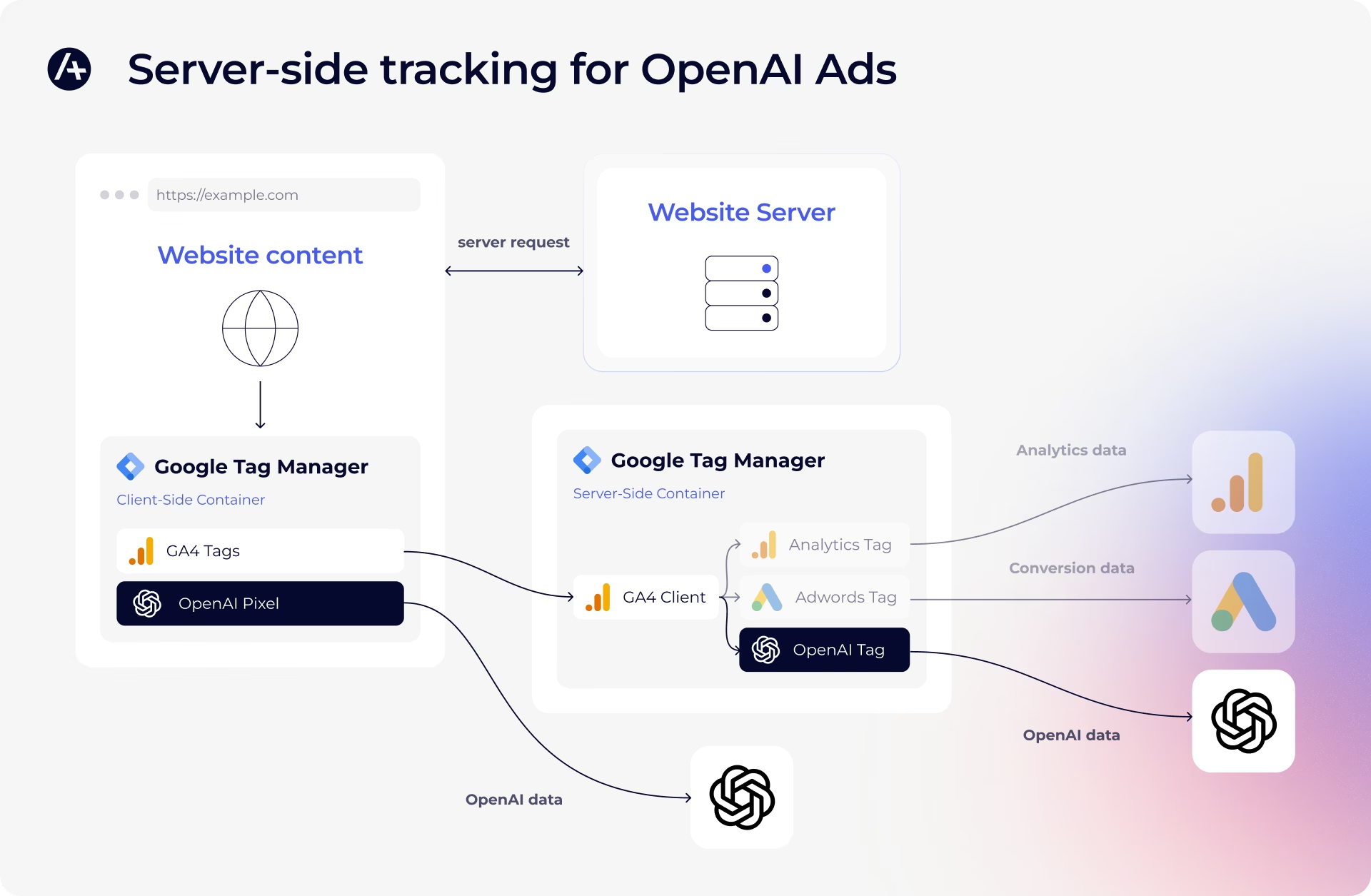
This doesn’t necessarily mean you have to give up client-side entirely. Running both approaches in parallel (the pixel for what it can capture, and the server-side conversion for what it misses) can be one way to do it.
How to get started with OpenAI Ads and server-side tracking
If you’re planning to run both the client-side and server-side implementations, start with setting up the pixel, since the server-side tag reuses its event ID. Refer to the complete OpenAI Ads Pixel walkthrough created by our collaborator Lucas Rollin, which covers installing the Google Tag Manager tag, configuring events and user data, and verifying your setup.
Then, head to the Addingwell OpenAI CAPI documentation to learn how to set it up in your server container, trigger it correctly, and verify deduplication against the pixel.
The author