Addingwell: How Ad Blockers Hide 25% of Your Data
Ad blockers hide up to 25% of your analytics data. James Ensor explains how server-side tagging recovers it while staying consent-compliant.


Depending on your audience, around a quarter of your traffic may be using an ad blocker.
Every one of those visitors is a hole in your data. Not simply a missed ad, but also a tracking request that never fires, a conversion that never registers, a user your ad platforms never see. The proportion varies widely by audience age, device, and country, but for most sites it's large enough to distort the numbers you actually make decisions based on.
This guide provides a complete primer on the full picture: why ad blockers block what they block, how server-side tracking can help, where it falls short, and how we approach it at Addingwell.
Disclaimer: To be clear up front, the goal is to reclaim data you're entitled to, not to get around users' decisions. Anyone who genuinely opted out should stay out of your tracking. This guide covers the measurement you lose from visitors who did agree to be tracked.
How do ad blockers work, and what do they actually block?
An ad blocker is a browser feature or extension that blocks tracking-related requests.
As your page loads, an ad blocker inspects every request the browser is about to send and checks it against blocklists that are maintained and constantly updated to keep pace with new bypassing techniques. If a request matches, it's dropped before it ever leaves the browser.
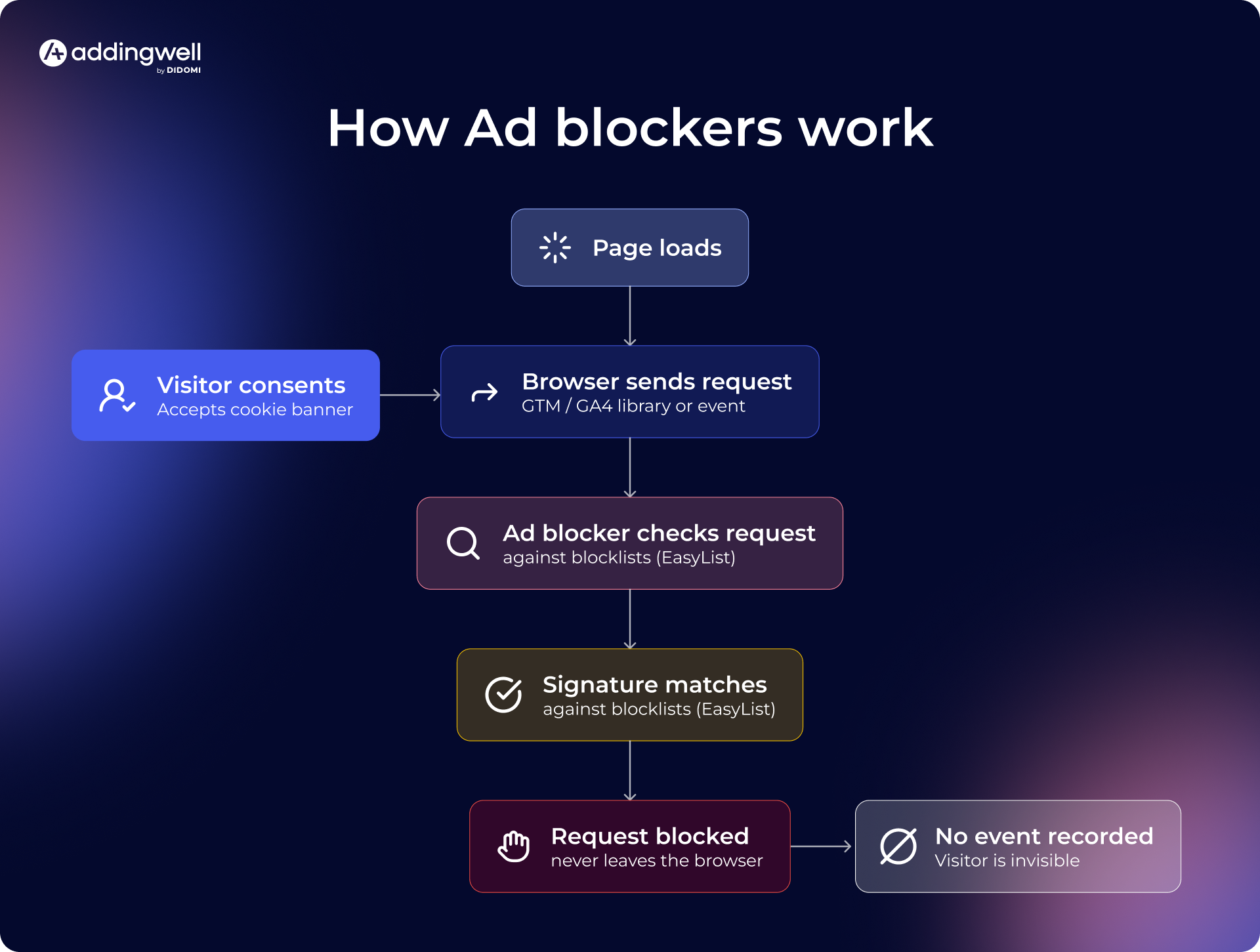
The lists work on recognizable signatures. The EasyList privacy list, for example, includes strings such as googletagmanager.com, .js?id=GTM-, and /gtag/js?. When your GA4 and GTM libraries load from Google's domains under their default filenames, those requests are textbook matches. If you do nothing, ad blockers will block the Google Tag Manager and Google Analytics libraries outright, and everything downstream of them will be affected.
The scope of ad blockers is wider than the name implies. They target requests tied to advertising, web analytics, and affiliation alike, which is why they hit your entire measurement stack, not just your banner inventory. How much of your traffic uses them depends heavily on your audience, including its age, the devices it uses, and the country it's in.
Research has shown that a young, technical, desktop-heavy audience can perform well above average, while a broad consumer base on mobile may score lower.
How server-side tagging helps
Client-side tracking setups are vulnerable for structural reasons: they run where ad blockers live. The scripts, requests, signatures, and lists all execute in the browser, in full view of the extension.
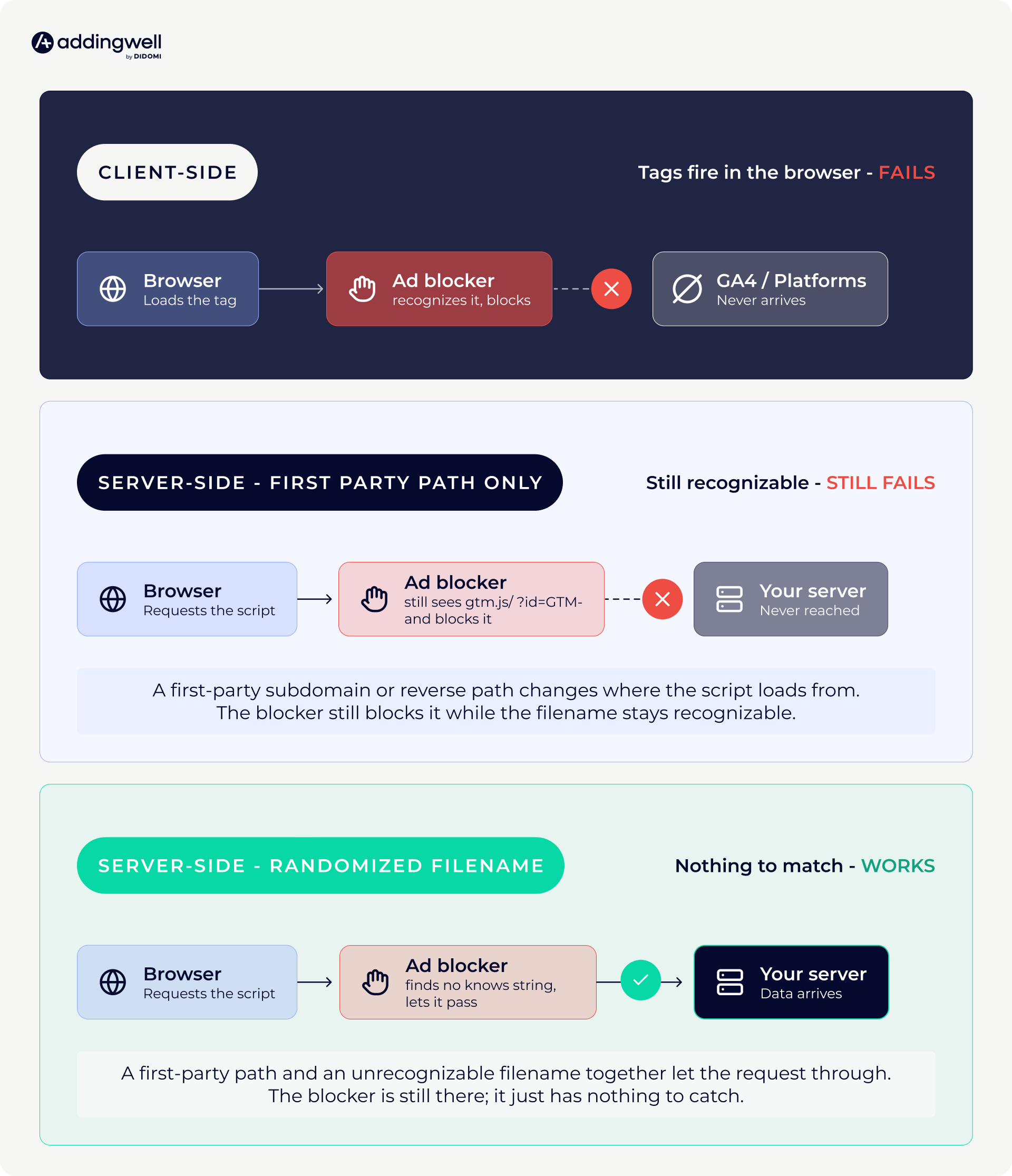
In a server-side implementation, the browser makes a single handoff to a tagging server running on a subdomain of your site, and all analytics and advertising tags execute there instead of in the browser. From the blocker's vantage point, the traffic now originates from your domain, not from the third-party scripts its lists were written to catch.
The upside of this approach goes further than ad blockers. Because the tags run on infrastructure you operate, you can decide what actually reaches each vendor instead of leaving an advertising SDK to scrape what it likes from the page, and your pages get lighter because the browser is no longer hauling a stack of vendor scripts on every load.
But server-side alone isn't enough.
Moving the container fixes where your data goes, not how tracking loads. The GTM and GA4 libraries still load from Google's domains under their default names, so the blocker kills the script in the browser before your server endpoint ever hears from it. Recovering that traffic takes one more step beyond the migration.
What actually works with ad blockers
Addressing ad blockers appropriately means making your tracking components load undetectably, not just where they ultimately send data. It comes down to three components, each served from a non-detectable URL. The core idea is one small transformation, applied consistently:
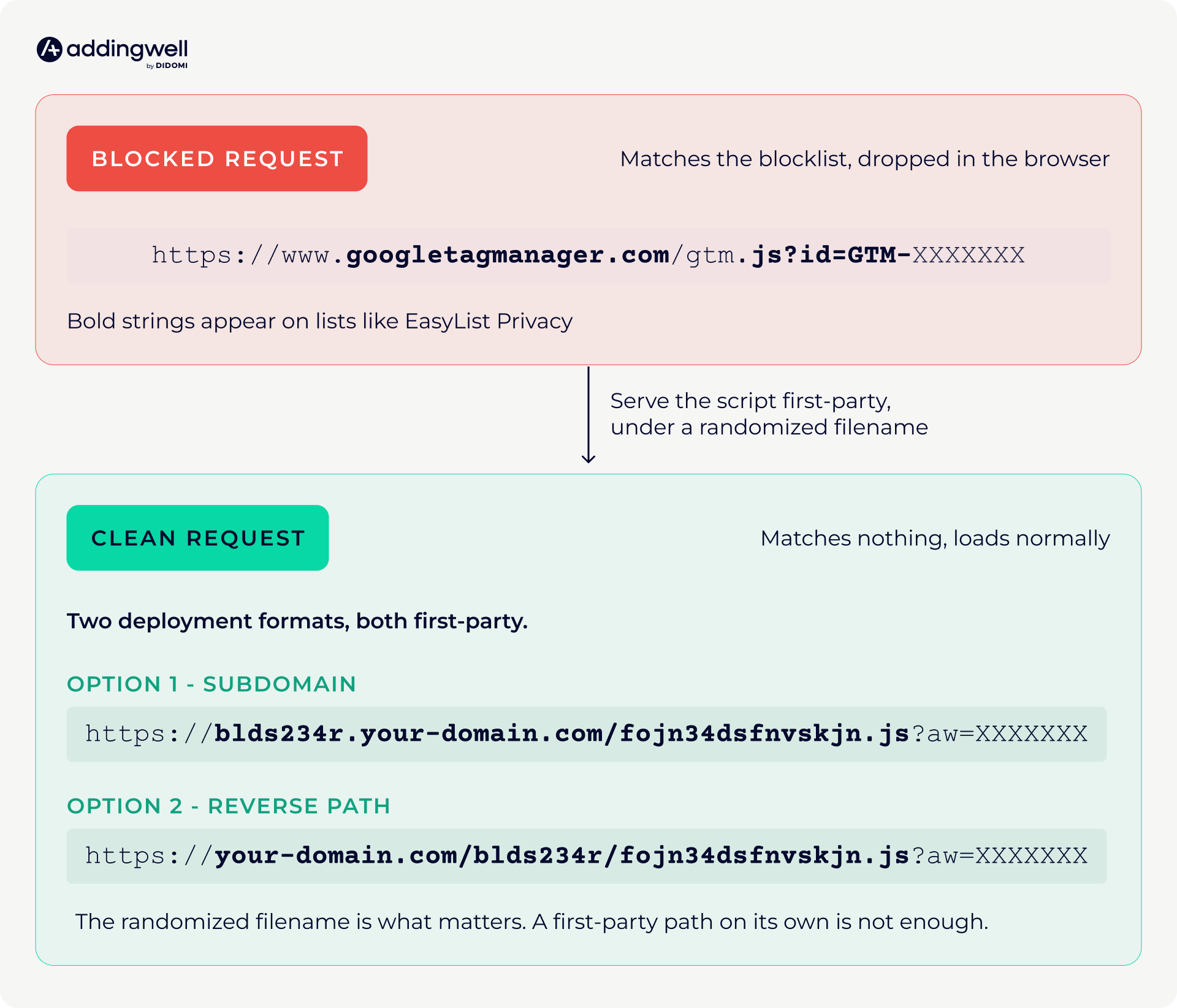
The blocked request wears every string the lists look for. The clean one loads from your own subdomain under a randomized filename, so there's nothing left to match. Apply that same logic to three things and the bypass is complete:
- The GTM library. The main tag manager script loads from your tracking subdomain rather than googletagmanager.com, using a name that matches nothing on the blocklist.
- The GA4 library. This one follows automatically once the GTM library is proxied, as long as you have a Google tag in your container. It's less a separate task than a consequence of the first.
- The /g/collect event requests. The actual GA4 event calls get edited to travel the same undetectable path, so collection isn't blocked either.
All three components have to load cleanly. If any single one gets caught (gtm.js, the GA4 library, or /g/collect), the tracking fails completely. That's why proxying just the library, the most common half-measure, leaves you exposed, since the other two components can still be blocked, and either one is enough to break the whole chain.
The most important prerequisite is that your GA4 tag must already be in server-side mode, with the server_container_url pointing to your tracking subdomain, before any of this helps. If you're still running a client-side Google tag without that parameter, don't implement the bypass yet. Proxying the library while the data still has nowhere proper to go just hides a broken request.
The underlying principle is the same throughout, giving the ad blocker nothing to catch. Load every component under a name and from a domain that doesn’t appear on any list, and if nothing else matches, the events reach the server container you set up. You've removed every signature the ad blocker was told to look for.
Two ways things can go wrong after setup
Before you call this done, two caveats are worth internalizing, because both are easy to get wrong even after a clean setup.
1. Ad blockers are a moving target, and there’s no permanent fix
Although server-side tracking is the first step to overcome ad-blocker limitations, it is not a one-and-done solution.
Blocklists update constantly, so a naming scheme that's invisible today can be targeted tomorrow. A managed platform like Addingwell can help by monitoring the lists and adjusting the loading scheme as they shift, so the bypass keeps holding without work on your side.
2. Recovering measurement should never override user choices
Recovering ad-blocked measurement and collecting data from people who said no can look similar if you're not deliberate.
But an ad blocker is not an opt-out. Someone running uBlock has made no statement about your analytics, and someone who accepted your CMP prompt has agreed to be measured, regardless of which extensions they run. Server-side should enforce the consent decision you actually hold and capture what it covers, not reach visitors who declined. Your Consent Management Platform (CMP) remains the source of truth, and moving server-side should tighten your grip on it, not loosen it, since you now choose exactly what you forward to each partner rather than trusting an in-browser SDK to behave.
That's why we developed our Event Consent Monitoring solution: to provide a per-tag, per-event record of what fired under which consent status, auditable enough to hand to a DPO or regulator directly. Learn more about Event Consent Monitoring.
What adblocker recovery actually looks like
The reason to go through all this is that the recovered data is substantial, and it shows up where it counts.
La Revue du Praticien, a subscription publisher for healthcare professionals, is a clean example for adblocker data recovery, precisely because publishers have some of the most ad-blocker-heavy audiences on the web. Ad blockers were breaking the paywall that protects their premium content, letting non-subscribers through by blocking the scripts behind it.
Hosting the GTM server-side in first-party mode under a renamed file made the script invisible to most blockers, fully restoring content protection, closing the free-reading loophole, and resulting in a 10% rise in paywall impressions and a 10% lift in page views.
Another example is the leading European furniture and home decor brand, Maisons du Monde. Ad-blocker and Safari ITP resilience were part of a broader server-side move, one that gave them reliable enough data to rethink how they bid, feeding real margin and post-purchase signals into Google Ads that browser-side tracking had never delivered cleanly:
Initially, we tended to adopt a pre-click logic, thinking that we should focus investments on high-margin products and reduce spending on lower-margin ones. However, a clicked product is not necessarily a purchased product, and the number of items in the cart can vary.
- Victoire Clouët des Pesruches, Head of Performance Acquisition at Maisons du Monde
Discover more adblocker and server-side optimization testimonials from the companies that decided to make the jump to server-side tracking.
Putting this into practice
If you're ready to set it all up, the Addingwell documentation provides the exact steps, from proxying the GTM library in the CDN section to the WEB-container identifier and how to verify you're no longer seeing blocked requests.
Need help getting started or running into issues during implementation? Book a chat with our experts and let’s take a look together.
The author